

CHAIR VISUAL COMMERCE SOFTWARE

3D chair configurator

The right chair, made theirs
Give customers the freedom to combine seat designs, bases, upholstery and finishes. With iONE360, they can also bring their configured chairs together with a configured table and see how the combination works.

More choice, made manageable

Combine seat designs, bases, fabrics and wood or metal finishes using the product rules that fit your collection.

Chairs and tables together

Visualize configured chairs alongside a configured table to help customers assess the complete dining setup.

Visual choices, usable data

Turn chair configurations into structured product information that supports quotations, orders and bills of materials.
GET RESULTS

The potential of a connected visual experience

+15% to +35%
online conversion increase potential with 3D product configuration
+20% to +50%
average order value increase potential when room planning helps sell complete interiors
-30% to -45%
returns reduction potential when configuration and room planning work together
TRY IT

Explore a chair configurator in action

Render
3D view
AR view
Click image to zoom

Mobile devices only

View this piece of furniture in your space

OPEN THIS PAGE ON YOUR MOBILE DEVICE

Point your smartphone or tablet camera at the QR code below to launch the feature.

Make it your own

Contact us about:

Please grant us permission to store your information so we can contact you. For further info, please see our privacy policy.

×
Creating high resolution render...
Zoom render pinch Pinch to zoom

Why choose iONE360 for your chair collection?

Choosing a dining chair rarely happens in isolation. iONE360 combines detailed chair configuration with room planning, so customers and sales teams can explore the chair itself and see how it works with their chosen table.
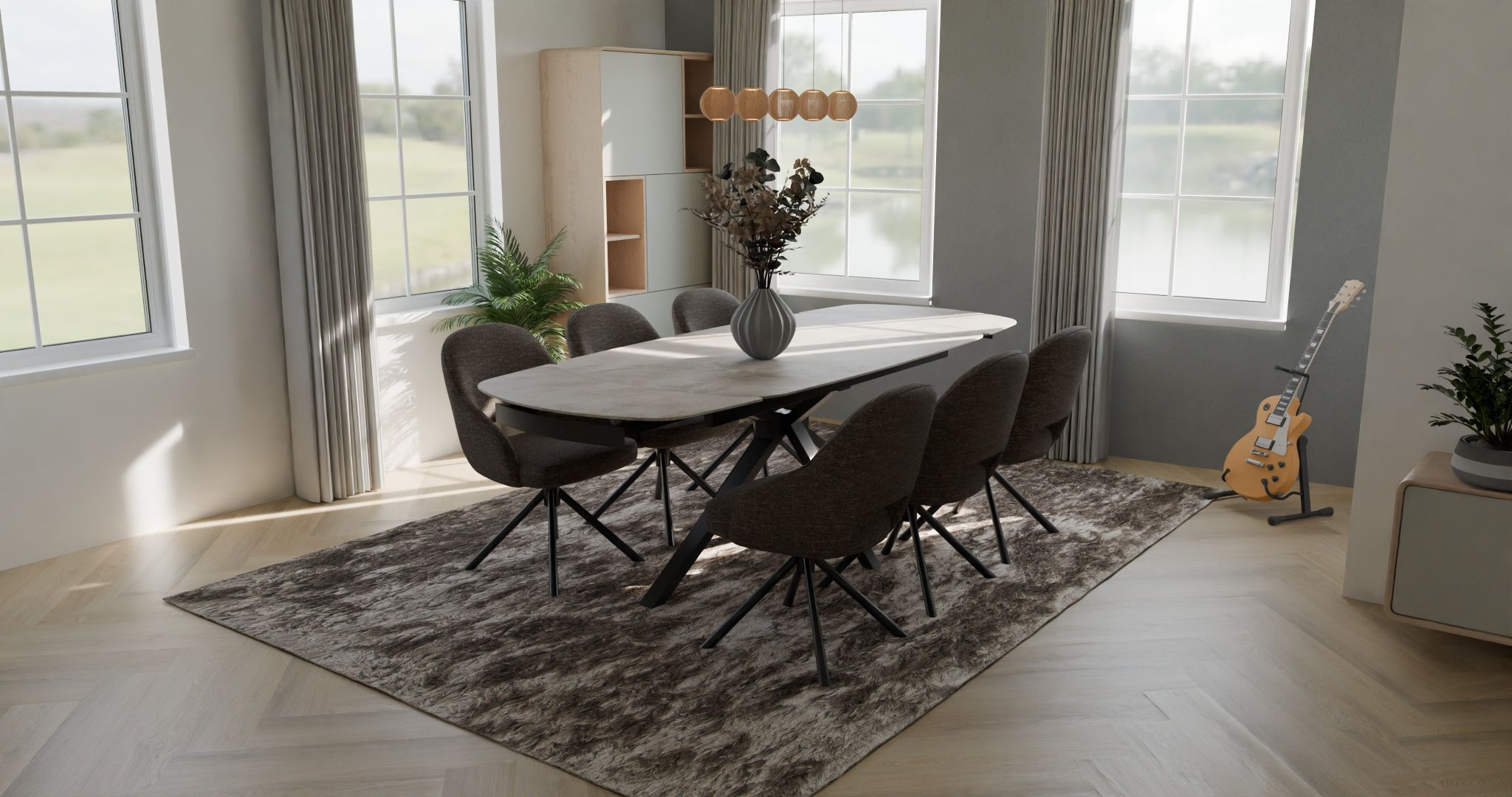
4K render made from roomplanner with Habufa H&H and Xooon furniture

From chair options to a complete dining setup

Manage your chair collection centrally and use the same digital assets in configuration, room planning and sales channels.

  • Manage without coding: maintain seat options, bases, materials, finishes and prices in the CMS.
  • Visualize together: bring configured chairs and tables into the same room plan.
  • Use the details: support quotations and orders with structured configuration data.
BUILT FOR CHAIR COLLECTIONS

Seats, bases and finishes that belong together
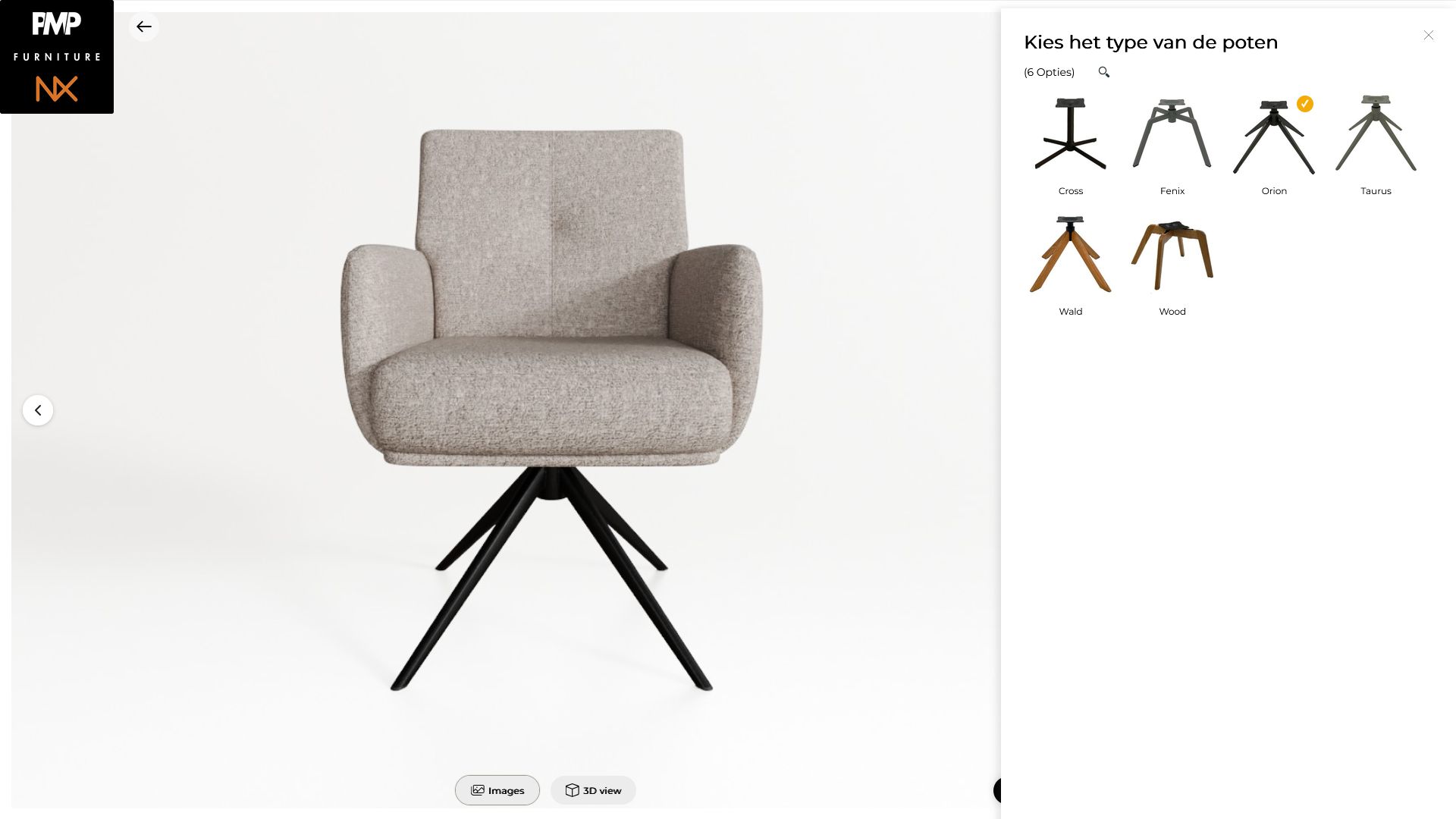
A chair range can combine different seats, arm options and bases with upholstery, wood and metal finishes. Product rules help make the available combinations clear while allowing customers to explore the options visually. A single model range can offer thousands of possible variants.
3D configurator for chairs with automated packshot renders

The perfect chair and table combination

Configure the chair and table separately, then bring them together in a room plan. Customers can see the selected upholstery, finishes, shapes and sizes as one complete dining combination.

Explore practical questions together: how many chairs might fit around the table, how they relate to the table base, and whether chair arms may fit beneath the tabletop. Use the visual plan alongside the actual product dimensions to confirm clearances before ordering.

Explore the 3D room planner → · Explore table configuration →

Thousands of chair variants. Product shots on demand.

When seat designs, bases, fabrics and finishes are combined, a chair range can quickly have thousands of potential variants. Photographing every combination from multiple views takes considerable time and effort.
With iONE360, configured 3D assets can deliver high-quality product shots of valid chair variants in multiple views, on demand. Scale visual content without a separate photoshoot for every option.

For manufacturers & brands

Maintain chair configurations centrally, embed them on dealer websites and publish products to HomeDecoHub to reach more retailers with the same 3D assets. Explore HomeDecoHub →

For retailers & showrooms

Help customers explore chair designs and finishes, then visualize their selection around a configured table.

For ecommerce & dealer sites

Bring interactive chair configuration to your website and make it available to dealers through an embeddable experience.
WHAT

More than a chair configurator

Chair configuration

Combine seat designs, base options, upholstery and finishes in a visual configuration experience. Explore the product configurator →

Materials and finishes

Show the character of upholstery and wood or metal finishes with detailed digital materials. Explore 3D material creation →

Your collection, managed centrally

Use the product management CMS to create configurations without code and manage materials, finishes, prices and options. Your iONE360 fee does not increase simply because your collection, material range or turnover grows. Explore the platform →

Room planning

Combine configured chairs and tables in a room plan. Products can also be published to HomeDecoHub’s multi-brand room planning platform. Explore room planning →

Structured data for orders

Connect configuration choices to structured product information that supports quotes, orders and bills of materials. Explore integrations →

AR view

Extend your chair experience with AR and other visual applications, using the same digital assets in more places. Explore augmented reality →
FAQ

Chair configurator and visual commerce FAQ

Can customers combine different seats and bases?

Yes. Chair configurations can offer different seats, bases, upholstery and finishes according to the product rules you define.

Can customers see their configured chairs with a table?

Yes. In room planning, customers can combine configured chairs with a configured table to explore the complete dining setup.

Can room planning help assess whether chairs fit around a table?

It helps customers and sales teams visualize the arrangement, table base and chair armrests in relation to the tabletop. Check the actual product dimensions and clearances before ordering.

Can chair configurations support orders?

Yes. Configuration choices can be translated into structured product information to support quotation, ordering and bill-of-materials workflows.

How can iONE360 integrate with our systems and sales channels?

Choose a straightforward embed for your website or dealer sites, ready-to-use integrations where available, or API-based approaches for more tailored systems. Explore integration options →

How much does a chair configurator cost?

Pricing depends on the capabilities, services and integrations your project needs. Find more information and request a quote →

READY TO VISUALIZE EVERY CHAIR OPTION?

Make your chair collection work harder

Bring together chair configuration, table combinations, central product management and dealer distribution with iONE360.
Recognized by analysts. Awarded by specialists.
iONE360 Gartner Representative Vendor
red dot award iONE360
ion360 award winning software - adesign
ione360 award winning software - prime design
Trusted by
Scroll to Top
cookies-website
Privacy Overview

This site uses cookies to provide you with the best possible user experience. Cookie information is stored in your browser and performs functions such as recognizing you when you return to our site and helping our team understand which parts of the site you find most interesting and useful.