

High-quality product images for évery configuration at scale

Photorealistic product rendering
automatically,
and cost-efficiently
Packshot rendering built into the 3D product configurator

- Access images of every product and every variant in perfect quality
- Higher realism removes doubt and increases conversion
- Significantly reduce your visualization costs (-6x) at the same time!
Business Case Calculator
Material options
Shape options
Product quantity
Business case
Calculation
- Unlimited visuals
- High quality product renders
- Seamless flow between renders and 3D
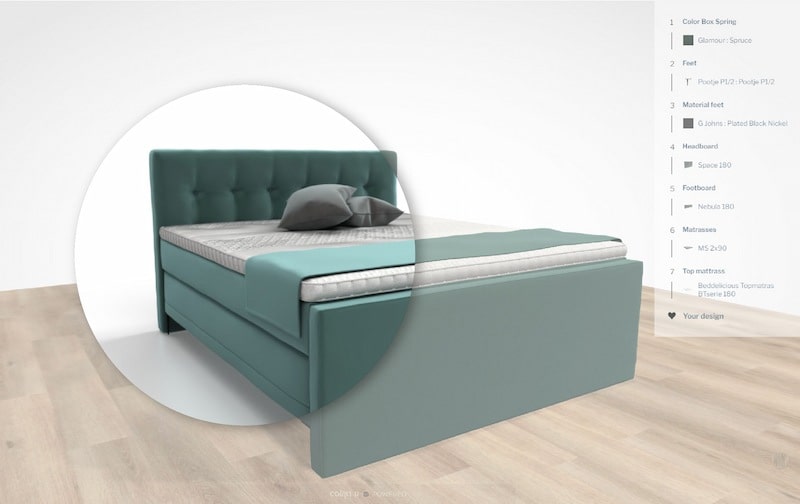
Switch between renders and 3D
Learn more about CGI for furniture
CGI (or computer generated images) for furniture is a digital alternative to product photography. A product render is a computer generated, high quality image of a product which can hardly be distinguished from traditional photography. Rendering allows you to change textures and materials, product design details, get multiple lifestyle scenes and show the object from different points of view, without producing a physical prototype. Rendering is a perfect tool for customizable products, but is also used in architecture, video games, animated movies, simulators, TV special effects and design visualization.
What do you need to create a 3D render?
You don’t need a physical prototype to create a 3D render. A product render can be based either on reality, but it can be completely fictional as well, even though the end result looks completely real. The input for the computer to be able to create a product render, is one or multiple 3D models as well as a 3D scene for the environment. For creating your 3D assets, you can make use of our full content creation services.
CGI vs product 2D rendering
CGI (or computer generated images) is just another word for product 2D rendering. CGI is the process of digitally creating the highest quality, three-dimensional images of spaces and/or products. Even the finest details can be shown, from colors, fabrics and finishes to shading and lighting, which give a true representation of the design. With regard to interiors and exteriors, it is even possible to show precise distances and specific measurements between furniture, doors and windows.
The benefits of CGI
Rendering is a quick and relatively cheap digital alternative to traditional product photography, especially suitable for customizable products. You can create as many visuals as you want, in photorealistic quality and for only a fraction of the costs of traditional photography. The quality of 2D renders is so realistic and precise, you cannot tell the difference from a traditional photograph. Once the 3D model is created, there is no limit to what you can do with it. Each model can be placed in any creative context: from highly realistic to total fantasy. This makes it possible to explore different design options and make changes early on in the design process, eliminating any possible issues later down the line. CGI help customers to fully understand the product or design and visualize the end result in incredible detail. This will help to avoid disappointment and material waste and create maximum customer satisfaction in the end.
Types of CGI
There are several levels of CGI used for visualizing furniture.
Artist rendering
A process by which 2D renders are created manually by combining models, components and materials within specialized software. For each and every possible variant, each configuration and every material or color, this process is repeated.
Automated pre-rendering
With this technique, digital photos of all possible configurations are generated automatically, based on pre-made images of all models, components, elements, materials and features. All pre-made images are uploaded to the system and displayed whenever a customer configures that particular combination.
Automated CGI
With automated CGI, the product image is composed live and on demand, while the customer is configuring. Previously created renders are saved so that each image only needs to be created once. This groundbreaking technique works fully automated and shows the images just within seconds. By working with on-demand models only, you don’t have to create a huge amount of (partly irrelevant) images, saving immensely on your visualization costs. Especially in the terms of CGI for Furniture.
Physically Based Rendering (PBR)
Physically based rendering is a collection of rendering techniques, using realistic shading and/or lighting models along with measured surface values to accurately represent real-world materials. The result is near to perfect, creating beautiful, highly realistic images that can hardly be distuinquished from real photographs. By using physical parameters, materials will look correct regardless of lighting conditions. For example, showing metallic or velvet fabrics.CGI