

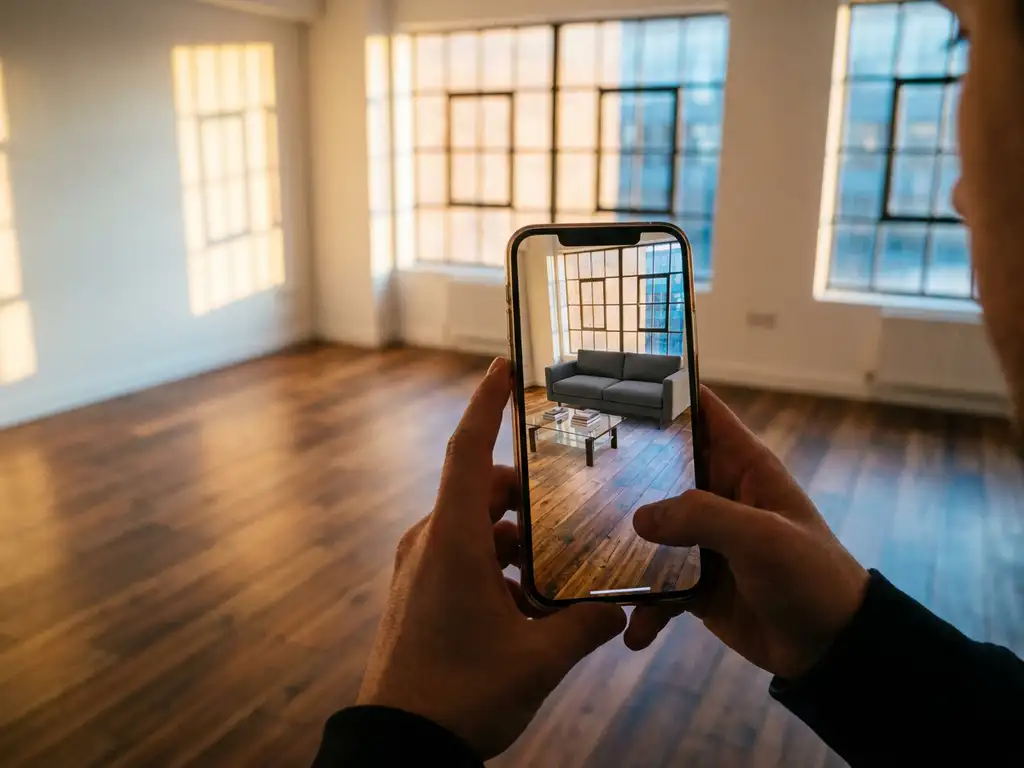
Yes, room visualizers can work with augmented reality (AR) features. Modern room planning software integrates AR capabilities that allow users to place virtual furniture in real spaces using their smartphone or tablet cameras, creating an immersive preview of how products will look in their actual rooms before making a purchase.
What is a room visualizer with augmented reality?
A room visualizer with augmented reality (AR) is a digital tool that combines 3D room planning software with AR technology to overlay virtual furniture and decor items onto real-world spaces through a device’s camera. Users can place, move, and configure products in their actual rooms to see realistic previews before purchasing.
These advanced visualization tools go beyond traditional room planning software by using the device’s camera to map the physical environment and accurately place virtual objects within it. The technology recognizes surfaces, lighting conditions, and spatial relationships to create convincing representations of how furniture will actually look and fit in a given space.
The most sophisticated AR room visualizers include product configuration capabilities, allowing users to change colors, materials, and sizes while viewing items in their real environment. This creates a comprehensive shopping experience where customers can design entire rooms, see pricing updates in real time, and make purchase decisions with complete confidence.
How does augmented reality work in room planning tools?
Augmented reality (AR) in room planning tools works by using a device’s camera and sensors to map the physical environment, then overlaying 3D furniture models onto the live camera feed. The software tracks surfaces, lighting, and spatial dimensions to ensure virtual objects appear realistically integrated with the actual room.
The process begins when you point your smartphone or tablet camera at the space where you want to place furniture. The AR software analyzes the camera feed to identify horizontal surfaces like floors and tables, vertical surfaces like walls, and the overall room geometry. Advanced systems also detect lighting conditions to ensure virtual furniture matches the ambient lighting of the space.
Once the environment is mapped, you can select furniture from the product catalog and place it in the scene. The software calculates the correct scale, perspective, and shadows to make virtual items appear as if they’re actually in the room. You can move objects around, rotate them, and configure different options like colors or materials while maintaining the realistic AR visualization.
What are the benefits of AR-enabled room visualizers?
AR-enabled room visualizers provide increased customer confidence, reduced returns, and higher conversion rates by allowing shoppers to see exactly how furniture will look in their actual space. This eliminates guesswork and creates a more engaging, interactive shopping experience that leads to better purchasing decisions.
For customers, the primary benefit is the ability to make informed decisions without visiting physical showrooms or relying on imagination. They can test different furniture combinations, see how pieces fit with existing decor, and verify sizing before ordering — which translates directly into fewer returns and higher satisfaction rates.
Businesses benefit from improved sales metrics and operational efficiency. AR visualization tools increase conversion rates because customers feel more confident about their purchases. The technology also reduces the burden on customer service teams who previously handled sizing and compatibility questions, while enabling sales of larger furniture sets as customers can visualize complete room makeovers.
Which devices support AR room visualization features?
Most modern smartphones and tablets support AR room visualization. iOS devices running ARKit (iPhone 6s and newer, iPad 5th generation and newer) and Android devices running ARCore both provide the necessary camera hardware, processing power, and motion sensors for accurate AR experiences.
iOS devices generally offer the most consistent AR performance due to Apple’s tight hardware and software integration. The ARKit framework, available since iOS 11, provides robust room mapping and object tracking capabilities. Many furniture retailers and 3D room planner applications prioritize iOS development because of this reliability.
Android support varies more widely depending on the specific device and manufacturer. Google’s ARCore platform supports hundreds of Android devices, but performance can differ based on camera quality, processing power, and sensor accuracy. Higher-end Android phones from manufacturers like Samsung, Google Pixel, and OnePlus typically provide AR experiences comparable to iOS devices.
How accurate are AR room visualizers for furniture placement?
Modern AR room visualizers achieve accuracy within 1–2 centimeters for furniture placement when used correctly, making them reliable for most purchasing decisions. Accuracy depends on lighting conditions, surface textures, and how carefully the app’s environment-mapping setup is followed.
The most accurate results come from using AR visualizers in well-lit rooms with distinct surface textures that give the software clear reference points. Rooms with plain walls, minimal lighting, or highly reflective surfaces can reduce accuracy. Most applications include calibration features — such as measuring known objects or distances — to improve precision.
For practical furniture shopping, current AR accuracy is sufficient to determine whether pieces will fit and how they’ll look in a space. For precise built-in installations or tight spaces, manual measurements are still recommended as a backup. The technology continues to improve, with newer devices offering enhanced depth sensing and better environmental mapping.
What should businesses consider when choosing AR room visualization software?
Businesses evaluating AR room visualization software should prioritize four areas: integration capabilities, visual quality, device compatibility, and scalability. The solution must work seamlessly with existing product catalogs, e-commerce platforms, and business systems while delivering photorealistic results across different devices and environments.
Integration requirements are critical: the AR visualizer needs access to a complete product database, including 3D models, pricing, and configuration options. Look for solutions that connect with existing PIM (Product Information Management), ERP (Enterprise Resource Planning), or e-commerce systems to ensure real-time inventory and pricing accuracy. The software should also support your specific product types and customization requirements.
Visual quality directly impacts customer confidence and conversion rates. Evaluate how realistic the 3D models appear, how well they integrate with different lighting conditions, and whether the software can handle complex product configurations. Also consider the time and cost required to create 3D assets for your entire product catalog, as this is often a significant implementation factor.
How iONE360 helps with AR room visualization
iONE360 is a specialist in visual configuration software for the furniture and interior markets, offering cost-effective, pragmatically scalable AR-enabled space planning solutions that integrate seamlessly with existing business systems. Our platform combines advanced 3D visualization, product configuration, and augmented reality in one tool that works across all devices and sales channels — making us the most complete AR room visualization solution available for furniture and interior brands.
Key capabilities of the iONE360 AR room visualization solution:
- Photorealistic 3D models with automatic generation from your product data
- Real-time configuration of colors, materials, and sizes within the AR environment
- Seamless integration with your PIM, ERP, and e-commerce platforms
- White-label customization to match your brand and user experience
- Proven results with furniture and home decor manufacturers across Europe
Ready to transform your customer experience with AR room visualization? Explore our showcases to see the technology in action, or contact us for a personalized demonstration of how iONE360’s AR-enabled room planner can increase your conversions and reduce returns.
Frequently Asked Questions
How long does it take to set up AR room visualization for my furniture catalog?
Implementation typically takes 4-8 weeks depending on your catalog size and integration complexity. The process includes 3D model creation, system integration, and testing across devices. Most businesses can start with a pilot program featuring their best-selling products to launch faster and demonstrate ROI before expanding to their full catalog.
What happens if customers have older phones that don't support AR features?
Quality AR room visualization platforms automatically fall back to traditional 3D room planning when AR isn’t supported. Customers can still place and configure furniture in virtual rooms, just without the camera overlay feature. This ensures all users have access to visualization tools regardless of their device capabilities.
Can customers save and share their AR room designs with others?
Yes, most AR room visualizers allow customers to save their designs and share them via email or social media links. This feature is particularly valuable for customers who want to get approval from family members or roommates before making large furniture purchases, and it also creates additional marketing opportunities for your brand.
How do you handle lighting differences between AR visualization and real-world conditions?
Advanced AR systems analyze your room’s actual lighting conditions and adjust the virtual furniture’s appearance accordingly. However, dramatic lighting changes throughout the day can affect how furniture colors appear. We recommend customers test their designs at different times of day and consider how artificial lighting will impact the final look.
What's the typical ROI timeline for implementing AR room visualization?
Most furniture retailers see positive ROI within 6-12 months through increased conversion rates and reduced returns. Early indicators include higher engagement metrics and larger average order values within the first few months. The exact timeline depends on your current conversion rates, return costs, and implementation approach.
Do I need to hire additional staff to manage AR room visualization technology?
No additional technical staff is typically required with modern cloud-based AR solutions. The platform handles technical maintenance automatically, and your existing customer service team can easily learn to support customers using the AR features. Most implementations include training and ongoing support to ensure smooth operations.
Can AR room visualizers work with custom or made-to-order furniture?
Yes, AR visualizers can handle custom furniture by allowing real-time configuration of dimensions, materials, and colors within the AR environment. Customers can adjust parameters like sofa length or table height and immediately see how the changes affect the piece in their space, making it ideal for businesses offering customizable products.