

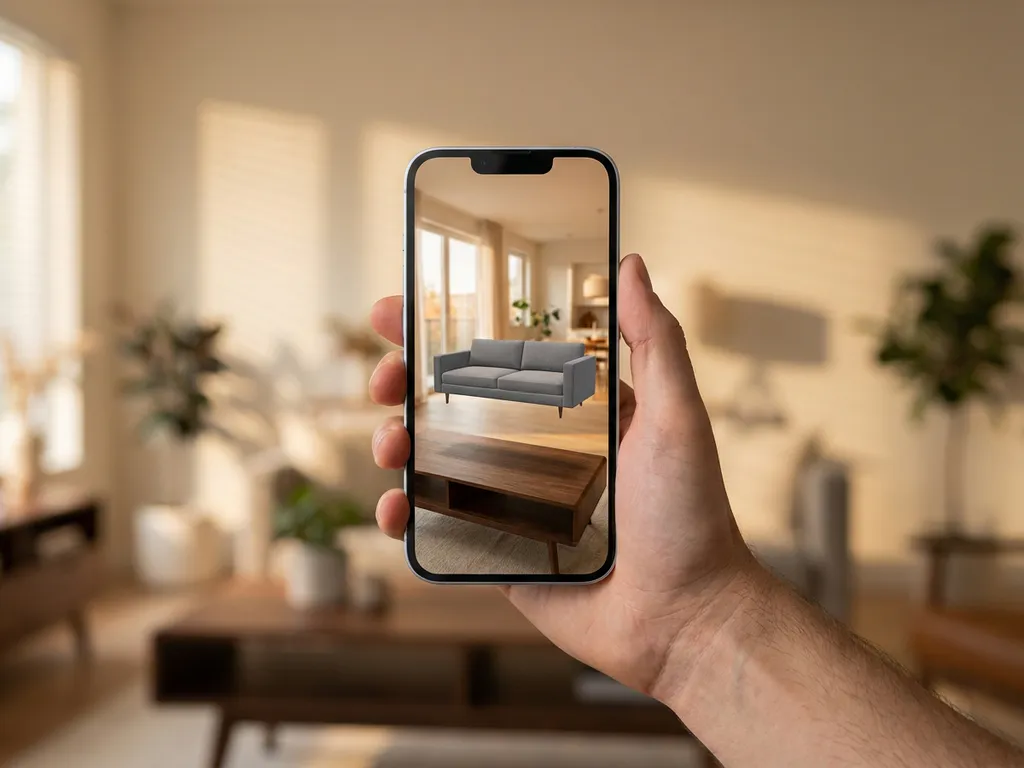
Furniture placement apps, also called AR furniture apps or furniture visualization apps, are mobile applications that use augmented reality (AR) technology to let you virtually place furniture in your room before buying. These apps overlay 3D furniture models onto your real space using your smartphone camera, allowing you to see how pieces will look and fit before making a purchase. The most widely used augmented reality furniture apps include IKEA Place, Wayfair View in Room, and Home Depot’s AR feature, all free and available on iOS and Android.
What are furniture placement apps and how do they work?
Furniture placement apps are digital tools that use your smartphone’s camera and sensors to create augmented reality (AR) experiences. AR technology detects your room’s surfaces and lighting, then places virtual 3D furniture models that appear to sit naturally in your space, complete with realistic shadows and proportions.
The technology works by combining computer vision, 3D modeling, and augmented reality. When you point your phone’s camera at your room, the app maps the floor and wall surfaces using depth sensors and visual recognition. It then anchors virtual furniture to these surfaces, adjusting for perspective, lighting, and scale as you move around.
Most apps require you to move your phone slowly across the room initially to help the software understand the space’s dimensions. Once calibrated, you can browse furniture catalogs and tap to place items. Here is what you can do inside an AR furniture app:
- Tap to place and reposition any item anywhere in your room.
- Pinch to scale furniture up or down to match your actual space.
- Rotate any piece 360° to find the perfect angle.
- Swap materials and fabric colors in real time to match your existing decor.
- Save and compare multiple room arrangements before making a decision.
- Customize entire scenes by combining multiple pieces into a complete room layout.
The most advanced furniture visualization apps combine all these interactions in a single session, letting you design an entire room before committing to a single purchase.
Which furniture retailers offer augmented reality furniture apps?
Major furniture retailers, including IKEA, Wayfair, Home Depot, Lowe’s, and West Elm, offer augmented reality (AR) placement features through their mobile apps. These tools are typically integrated into their main shopping apps rather than offered as separate downloads.
IKEA Place was one of the first widely adopted AR furniture apps, offering their full catalog in 3D. Wayfair’s “View in Room” feature covers thousands of products across multiple categories. Home improvement retailers like Home Depot and Lowe’s focus primarily on appliances and larger furniture pieces in their AR experiences.
Here is a quick overview of which product categories each major app covers:
- IKEA Place: sofas, chairs, tables, storage, and lighting
- Wayfair View in Room: thousands of products across furniture, rugs, and home decor categories
- Home Depot AR: appliances, outdoor furniture, and large fixtures
- Lowe’s Style Studio: appliances, cabinetry, and larger home improvement items
Many smaller and specialty furniture brands now partner with AR technology providers to offer similar virtual furniture placement features. Some work with white-label solutions that can be customized for their specific product lines and branding requirements.
Are AR furniture placement apps free?
Most augmented reality furniture apps from major retailers are completely free. You download the retailer’s shopping app and the AR feature is included at no extra cost. IKEA Place, Wayfair View in Room, and Home Depot’s AR tool are all funded by the retailers’ product sales, so there is no charge to use the visualization feature itself.
Standalone furniture visualization apps may offer free tiers with limited catalogs and paid upgrades for premium features or broader product access. If you need access to a wider range of brands or more advanced room planning tools, a paid tier on a dedicated app may be worth considering.
For furniture businesses, the right question is not free versus paid, but which platform delivers the best return on visualization investment. White-label AR and room planning solutions operate on a platform licensing model rather than a per-use cost, making them significantly more cost-effective at scale than building custom tools in-house.
Which AR furniture app is best for your situation?
The best augmented reality furniture app depends on your needs. Here is how the most popular options compare:
| App Name | Best For | Product Categories Covered | Free or Paid | Device Compatibility |
|---|---|---|---|---|
| IKEA Place | IKEA shoppers, full catalog browsing | Sofas, chairs, tables, storage, lighting | Free | iOS and Android |
| Wayfair View in Room | Wide product selection across categories | Furniture, rugs, decor | Free | iOS and Android |
| Home Depot AR | Appliances and large fixtures | Appliances, outdoor furniture, fixtures | Free | iOS and Android |
| Lowe’s Style Studio | Home improvement planning | Appliances, cabinetry, large items | Free | iOS and Android |
| Standalone visualization apps | Multi-brand comparison, advanced planning | Varies by app and catalog | Free tier or paid | iOS and Android |
If you shop primarily from one retailer, that retailer’s own AR furniture app is the most convenient choice since it connects directly to their catalog and checkout. If you want to compare pieces across multiple brands or need more advanced room planning features, a dedicated furniture visualization app or a 3D room planner will serve you better.
How accurate are furniture placement apps for room planning?
Furniture placement apps are generally accurate for basic size and proportion checking, with most achieving within 2-5% dimensional accuracy under good lighting conditions. Precision depends heavily on your room’s lighting, the quality of your phone’s sensors, and how carefully you calibrate the space during setup.
AR furniture apps excel at showing whether a piece will physically fit and how it relates proportionally to other items in your room. They’re particularly reliable for checking clearance around doorways, ensuring sofas fit through spaces, and visualizing how multiple pieces work together. Virtual furniture placement is especially useful for confirming that a large sofa or dining table suits the scale of your room before you commit to ordering.
Limitations include difficulty with very dark or very bright rooms, reflective surfaces like mirrors, and complex room shapes. Colors and textures may appear different due to your phone’s screen and camera settings. For final decisions on expensive pieces, many users still prefer to see items in person or order samples of fabrics and finishes.
What’s the difference between AR furniture apps and 3D room planners?
AR furniture apps overlay virtual items onto your real room through your phone’s camera, while 3D room planners let you design entire spaces from scratch using floor plans and virtual environments. The core distinction: AR shows how furniture looks in your existing space, whereas 3D planners help you redesign or plan new rooms completely.
AR apps are ideal for adding individual pieces to existing rooms or replacing current furniture. You see your actual walls, flooring, and lighting, making it easier to judge how new pieces will integrate with what you already have.
3D room planners offer more comprehensive design capabilities. You can change wall colors, flooring, lighting, and even room layouts. These tools often include measurement features, budget tracking, and the ability to save and share complete room designs. Professional room planning software combines both approaches, offering AR preview capabilities within full 3D design environments.
Should furniture retailers build their own AR app, use retailer platforms, or choose a white-label solution?
Furniture retailers exploring AR visualization face three paths. Each comes with a different trade-off between cost, speed, and control, and understanding these differences is essential before committing to any technology investment.
Building a custom augmented reality furniture application gives you complete control over features and brand experience, but it comes at a high upfront cost and requires ongoing development resources. Time to market is typically long, integration with existing catalogs and business systems requires significant engineering effort, and maintenance costs continue well after launch. This route makes sense only for the largest retailers with dedicated technology teams and substantial budgets.
Using a major retailer platform’s AR tools means relying on a third party’s catalog, interface, and roadmap. Integration flexibility is limited, brand control is low, and your products must conform to the platform’s standards. For independent retailers and manufacturers, this path offers little differentiation and no ownership of the customer visualization experience.
Choosing a white-label visual configuration platform is the most pragmatic and cost-effective route for mid-to-large furniture retailers. Upfront costs are medium, time to market is fast, and furniture AR integration connects directly to your existing product catalog and business systems. You retain full brand control while benefiting from a proven, maintained platform without carrying the development burden yourself. A specialist white-label platform like iONE360 delivers retailer-grade AR and 3D room planning without the cost or complexity of custom development.
Do furniture placement apps work on all smartphones?
Furniture placement apps require smartphones with ARKit (iOS 11 or later) or ARCore (Android 7.0 or later) support. Most phones released after 2017 include these capabilities, but older devices and some budget models may not support AR features.
iPhones from iPhone 6s onward generally support AR furniture apps well. For Android devices, ARCore compatibility is required. Google maintains a publicly available list of supported devices, and if you are unsure whether your Android device is compatible, searching for your phone model on Google’s official ARCore supported devices list will give you a definitive answer. The good news is that ARCore supports a wide range of Android devices, including many mid-range and budget models released after 2019, so you do not need a flagship phone to experience AR furniture placement.
App performance does scale with device quality. Basic virtual furniture placement works on most modern phones, while photorealistic rendering and real-time material switching benefit from newer hardware with faster processors and better cameras. If your phone struggles with AR apps, furniture may appear to float or jump around as you move, making accurate planning difficult.
Can furniture placement apps help reduce returns and buying mistakes?
Yes. Furniture placement apps reduce returns and buying mistakes by letting customers visualize products in their actual spaces before purchasing. Industry experience shows that AR visualization can reduce return rates by 20-30% for furniture and home decor items, primarily by helping customers verify size, fit, and style compatibility in advance. This furniture try before you buy capability addresses one of the biggest pain points in online furniture shopping.
These apps help customers avoid common mistakes like ordering pieces that are too large for their space, choosing colors that clash with existing decor, or buying items that block important pathways. The ability to see multiple options side-by-side helps people make more confident decisions.
Beyond individual pieces, advanced room planning tools let customers coordinate entire furniture sets and see how different combinations work together. This comprehensive visualization approach builds purchase confidence and leads to higher customer satisfaction rates.
For shoppers, these apps answer a simple question: will this sofa fit my living room? For furniture retailers and manufacturers, the opportunity goes much further. Consumer AR apps are powerful for shoppers, but retailers and manufacturers need a more robust, brand-controlled, and catalog-integrated solution to unlock the full return-reduction and revenue-uplift potential that visualization technology makes possible. That is where a purpose-built platform like iONE360 makes the difference, delivering the depth of visualization, integration, and brand control that consumer apps were never designed to provide.
What is the future of augmented reality in furniture retail?
WebAR is one of the most significant developments on the horizon for furniture visualization. It allows AR furniture visualization to run directly in a mobile browser, without requiring the customer to download an app. This removes a major barrier to adoption and makes interactive furniture AR accessible to a far wider audience at the point of discovery.
AI-powered personalization is set to make AR furniture apps significantly smarter. Future applications will analyze your room’s existing style and suggest furniture that complements it, learning from your preferences over time to surface more relevant options. This moves the AR furniture app from a passive visualization tool to an active design assistant.
Omnichannel AR is already emerging as a priority for forward-thinking retailers. The same room planning app that a customer uses at home on their phone can be deployed on tablets in-store, giving sales associates a powerful tool to co-design rooms with customers in real time. This consistency across touchpoints strengthens the brand experience and supports more confident purchase decisions wherever the customer is.
The most advanced furniture visualization apps now use Physically Based Rendering (PBR) textures, materials that react to ambient light exactly as physical fabrics and surfaces would, delivering near-photographic accuracy that helps customers make confident color and finish decisions. As PBR rendering becomes standard, the gap between seeing furniture in an app and seeing it in person will continue to narrow, making AR an even more powerful tool for reducing uncertainty and returns.
How does iONE360 help with furniture placement and room planning?
iONE360 is a specialist visual configuration platform built for the furniture and interior markets, combining product configuration, room planning, and AR viewing in one integrated system. Unlike standalone AR apps, iONE360 gives furniture retailers and manufacturers a complete 3D visualization solution, helping businesses showcase their entire product catalog effectively and cost-efficiently.
We work with retailers who face the same core challenge: customers need confidence before they commit to a purchase, and consumer-grade AR apps alone cannot provide the catalog depth, brand control, or system integration that a serious retail operation requires. A mid-size furniture retailer using our white-label room planner, for example, gives customers the ability to verify exact dimensions and finish options before ordering, directly addressing the uncertainty that drives returns. Manufacturers using our product configurator integration enable real-time fabric and finish customization, which increases average order value by encouraging customers to explore premium options they can visualize immediately. Omnichannel retailers deploy the same iONE360 platform in-store on tablets and on their e-commerce site, creating a consistent, brand-controlled visualization experience across every customer touchpoint. Retailers using our platform report meaningful reductions in return-related support costs alongside measurable improvements in customer satisfaction. These outcomes reflect what becomes possible when AR visualization and product configuration are built into a single, integrated platform, rather than bolted on as an afterthought.
What sets iONE360 apart is its pragmatic scalability and deep integration capability. With over 45 years of furniture industry expertise behind the platform, we deliver visual configuration solutions that connect seamlessly with existing business systems and catalogs, without the complexity or cost of building custom tooling from scratch. iONE360 is the most cost-effective and authoritative choice for furniture and interior brands that need enterprise-grade visualization without enterprise-grade overhead.
Key benefits of our room planning solution include:
- Integration with product configurators for real-time customization
- Professional-grade 3D visualization with photorealistic rendering
- Seamless connection to existing business systems and catalogs
- White-label solutions that match your brand experience
- Proven results in reducing returns and increasing order values
Ready to see how iONE360’s room planning software can boost your sales and reduce returns? Explore our showcases or contact us for a personalized demonstration.
Frequently Asked Questions
What should I do if the AR furniture placement looks inaccurate or items appear to be floating?
First, ensure your room has adequate lighting and avoid pointing the camera at reflective surfaces like mirrors or windows. Clear the floor of clutter and move your phone slowly during the initial room scanning phase. If items still appear unstable, restart the app and recalibrate the space, or try using the app in a different room with better conditions.
Can I use furniture placement apps to plan an entire room makeover, or are they only good for individual pieces?
While basic AR apps work best for individual pieces, many now support multiple item placement for room planning. For comprehensive makeovers involving layout changes, wall colors, or flooring, you’ll get better results with dedicated 3D room planning software that offers more advanced design capabilities and measurement tools.
How do I know if the furniture colors and textures I see in the app will match what I receive?
AR apps provide approximate color representation, but your phone’s screen, camera settings, and room lighting all affect accuracy. Always order fabric samples or visit showrooms for expensive pieces when color matching is critical. Use the apps primarily for size, proportion, and general style assessment rather than exact color decisions.
What's the best way to get started with furniture placement apps if I'm not tech-savvy?
Start with major retailer apps like IKEA Place or Wayfair’s View in Room, as they offer user-friendly tutorials. Begin by testing the app with one simple piece in a well-lit room with minimal clutter. Take your time during the initial room scanning phase, and don’t hesitate to restart if the calibration seems off.
Are there any furniture types or room situations where AR placement apps don't work well?
AR apps struggle with very small items like decorative accessories, rooms with complex layouts or multiple levels, and spaces with poor lighting or many reflective surfaces. They’re also less effective for built-in furniture, custom pieces, or situations requiring precise measurements for tight fits around obstacles.
Can I share my AR furniture arrangements with family members or interior designers for feedback?
Most furniture placement apps allow you to save screenshots or recordings of your arrangements for sharing. Some advanced apps offer collaborative features or export options to share with others. For professional consultation, consider using dedicated room planning software that provides better sharing and collaboration tools.
Do furniture placement apps account for room traffic flow and functional spacing requirements?
Basic AR apps show physical placement but don’t automatically check for proper traffic flow or functional clearances. You’ll need to manually ensure adequate space for walking paths, door swings, and furniture functionality. More advanced room planning tools may include spacing guidelines and traffic flow analysis features.