

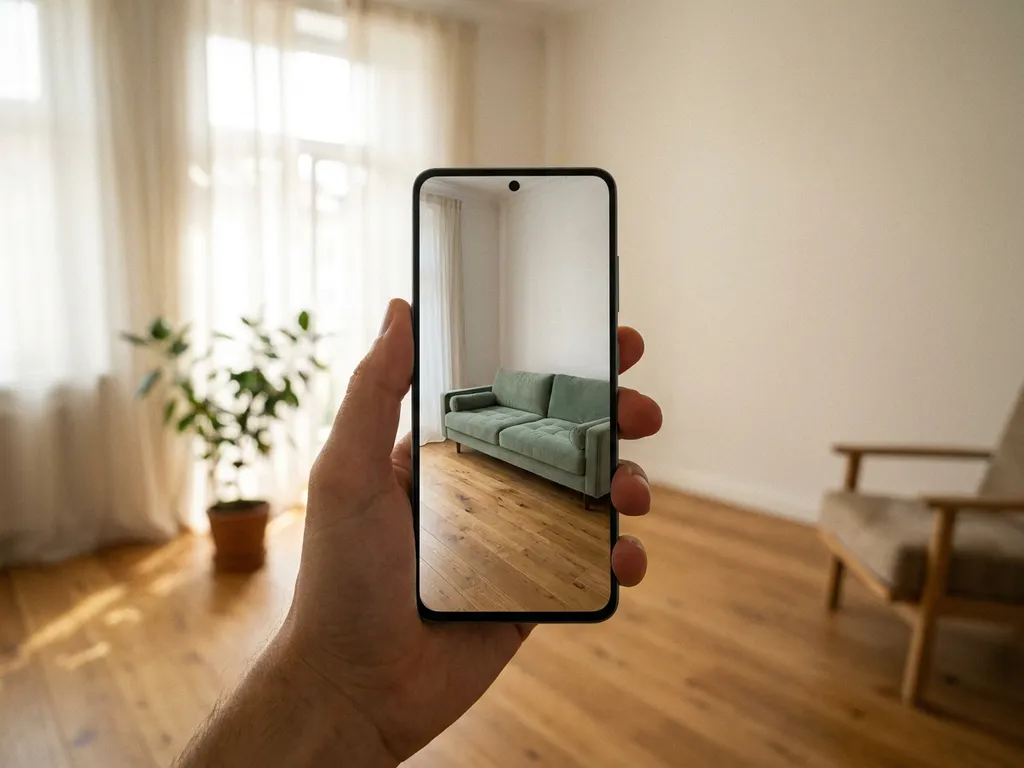
You can visualize new furniture in a room using digital tools such as augmented reality (AR) apps, 3D room planners, and online product configurators. These tools let you see how a specific sofa, table, or cabinet fits your space before committing to a purchase. Whether you are a consumer redecorating at home or a retailer helping customers buy with confidence, the right visualization tool removes guesswork entirely. Below, we answer the most common questions people ask when exploring furniture visualization options.
What tools let you see furniture in a room before buying?
The main tools for visualizing furniture in a room before buying are AR apps, browser-based 3D room planners, and interactive product configurators. Each serves a slightly different purpose: AR overlays a single product onto your live camera view, room planners let you design an entire floor plan, and configurators let you customize materials and dimensions before placing the item in context.
Here is a quick overview of the most common furniture visualization tools available in 2026:
- Augmented reality apps: Use your smartphone or tablet camera to place a virtual piece of furniture into your real room in real time.
- 3D room planning software: A web-based environment where you draw a floor plan and furnish it with products from a catalog, adjusting layouts and combinations freely.
- Product configurators: Interactive tools that let you choose fabric, color, size, and finish, generating a photorealistic image of your exact configuration.
- Packshot generators: Automated tools that produce high-quality product images across all variants without a physical photoshoot.
For most shoppers, the ideal experience combines more than one of these. A room planning tool paired with a product configurator, for example, lets you design an entire room while also customizing each individual piece on the spot. This combination is particularly powerful for complex purchases such as sofas, modular shelving, or made-to-order dining sets.
How does augmented reality furniture placement work?
Augmented reality furniture placement works by using your device’s camera and depth-sensing technology to map the physical space around you, then overlaying a scaled 3D model of a furniture piece onto that surface in real time. The result is a live view of how a specific product looks in your actual room, at the correct scale and from any angle.
Modern AR furniture tools run entirely in the browser, meaning no app download is required. The process typically works like this:
- You select a product and open the AR view from the retailer’s website.
- Your device camera activates and scans the floor or surface in front of you.
- The 3D model is placed into the scene at real-world scale.
- You can walk around the virtual item, reposition it, and view it from different angles.
- If the product is configurable, you can switch colors or materials and see the update instantly in AR.
The technology relies on WebAR standards, which have matured significantly. Today’s AR experiences render realistic materials including fabric textures, wood grains, and metal finishes with a level of accuracy that meaningfully reduces purchase uncertainty. For retailers, offering AR placement directly from a product page is one of the most effective ways to increase buying confidence and reduce returns.
What’s the difference between a room planner and a product configurator?
A room planner is a spatial design tool that lets you arrange multiple furniture pieces within a floor plan, while a product configurator is a customization tool focused on a single product, letting you select materials, dimensions, and features. The two tools address different stages of the buying journey and work best when combined.
To make the distinction concrete:
- A room planner answers the question: “Does this combination of furniture work in my space?” It focuses on layout, proportion, and how pieces relate to each other and to the room dimensions.
- A product configurator answers the question: “What should this specific piece look like?” It focuses on the product itself, its variants, and the visual outcome of each configuration choice.
When integrated into a single platform, the distinction becomes seamless. Room planning software that connects directly to a product configurator allows customers to place a sofa in their virtual room and then configure its fabric, leg color, and dimensions without leaving the planning environment. Prices and lead times update in real time, and the customer can proceed to checkout from within the same session.
For retailers selling complex or customizable products, this integrated approach removes the friction of switching between tools and dramatically shortens the path from inspiration to purchase.
How accurate are online furniture visualizers?
Online furniture visualizers are highly accurate when they are built on properly scaled 3D models and calibrated AR technology. Product dimensions, material textures, and lighting conditions can all be rendered with photorealistic precision. The main variable is the quality of the underlying 3D data, not the technology itself.
Accuracy depends on several factors:
- 3D model quality: Models built to exact product specifications produce the most reliable visual output. Low-resolution or approximated models introduce visible inaccuracies.
- Material rendering: High-quality visualizers replicate fabric weave, leather grain, wood texture, and metal finish accurately enough that customers can make confident material choices online.
- Room calibration in AR: The accuracy of AR placement depends on how well the device maps the physical space. Modern depth-sensing technology on current smartphones is reliable for standard room conditions.
- Scale fidelity: A well-built visualizer uses real product dimensions, so a three-seat sofa at 240 cm appears at exactly that width in the room plan or AR view.
Industry experience shows that when visualizers are built on accurate 3D assets, return rates drop meaningfully because customers receive exactly what they expected. The investment in high-quality 3D content pays for itself through reduced returns and stronger conversion rates.
Should retailers offer furniture visualization on their website?
Yes, furniture retailers should offer visualization tools on their website. Shoppers buying furniture online face a fundamental challenge: they cannot physically experience the product before purchasing. Visualization tools directly address this barrier by providing spatial context, material accuracy, and configuration flexibility, all of which increase purchase confidence and reduce costly returns.
The business case is straightforward. Customers who can see a product in their own space, in their chosen configuration, are more likely to complete the purchase and less likely to return it. Room planning tools in particular have been shown to increase buying intent significantly, because they help customers visualize not just one product but an entire coordinated room. Showing products in the right environment drives stronger emotional connection and clearer decision-making.
Beyond conversion, visualization tools also raise average order values. When customers can plan an entire room and configure each piece on the spot, they naturally consider combinations they would not have discovered by browsing product pages individually. This makes the room planner one of the most commercially effective tools a furniture retailer can deploy.
For retailers who sell through dealer networks or multiple channels, visualization tools also ensure brand consistency. Every retailer presents the products accurately, in the correct configurations, without relying on physical samples or inconsistent photography.
How iONE360 helps you visualize furniture in any room
We built iONE360 specifically for the furniture and home furnishings industry, and our platform brings together every tool discussed in this article into one integrated, web-based solution. Whether you need AR product placement, a full 3D room planner, an interactive product configurator, or automated packshot generation, everything runs from a single platform without fragmentation or downloads.
Here is what our room planning solution delivers for retailers and manufacturers:
- 3D room planning software that lets customers draw floor plans, furnish rooms, and experiment with layouts in real time
- Integrated product configurator so customers can customize fabric, color, size, and finish directly inside the room planner
- Augmented reality placement that works in the browser, no app required
- Real-time pricing and lead times updated as customers configure products
- Seamless integration with existing PIM, ERP, CMS, and webshop systems
- Two flexible deployment paths: a white-labeled room planner built for your platform, or onboarding to HomeDecoHub, our ready-to-use room planning marketplace
Built on over 45 years of furniture industry expertise, iONE360 is trusted by manufacturers and retailers across Europe who need a scalable, high-quality visual commerce solution that works across every sales channel. If you are ready to give your customers the confidence to buy, we would love to show you what is possible.
Get in touch with our team and discover how iONE360 can transform your furniture buying experience.
Frequently Asked Questions
How long does it take to set up a furniture visualization tool on a retail website?
Implementation timelines vary depending on the solution and the size of your product catalog, but a platform like iONE360 is designed to integrate with existing PIM, ERP, and webshop systems, which significantly reduces setup time. The most time-intensive step is typically preparing or converting your product catalog into accurate 3D assets. Once your 3D content is ready, the room planner and configurator can go live relatively quickly, and your team will not need to manage separate tools or platforms.
What if my products come in dozens of variants — can visualization tools handle large, complex catalogs?
Yes, modern furniture visualization platforms are built to handle extensive product catalogs with hundreds of variants, including combinations of fabrics, finishes, sizes, and configurations. The key is having a well-structured product data feed connected to your 3D assets, so every variant renders accurately without requiring manual updates. Automated packshot generation tools further reduce the workload by producing images for every configuration without a physical photoshoot, making large catalogs commercially viable to visualize at scale.
Do customers actually use AR furniture tools, or is it mostly a novelty?
AR furniture placement has moved well beyond novelty status — it is now one of the most practically useful features a furniture retailer can offer, particularly for large or high-investment purchases like sofas, dining tables, and storage units. Because modern WebAR runs directly in the browser with no app download required, the barrier to use is extremely low, and customers who engage with AR tools consistently show higher purchase confidence and lower return rates. The technology is most effective when paired with accurate 3D models and real-world product dimensions, which is what turns a visual gimmick into a genuine decision-making aid.
What are the most common mistakes retailers make when implementing furniture visualization?
The most common mistake is investing in the visualization technology without first ensuring the underlying 3D product data is accurate and high quality — poor models undermine even the best AR or room planning platform. Another frequent misstep is deploying visualization as a standalone feature disconnected from pricing, stock, and configuration logic, which creates a frustrating gap between what customers design and what they can actually order. Finally, many retailers underestimate the importance of placement: a room planner or AR tool buried deep in a product page will see far less engagement than one surfaced prominently in the shopping journey.
Can furniture visualization tools be used by sales staff in physical stores, or are they only for online shoppers?
Furniture visualization tools are highly effective in physical retail environments and are increasingly used by sales staff as consultative selling aids. A sales associate can use a tablet-based room planner to help an in-store customer design their living room in real time, configure each piece, and walk out with a complete, priced room plan rather than a vague shortlist. This approach extends the value of the tool beyond e-commerce and creates a consistent, high-quality experience across every sales channel, whether online, in-store, or through a dealer network.
How do I know if my existing product photography can be replaced or supplemented by 3D visualization?
If your current photography struggles to keep pace with new product launches, variant expansions, or seasonal updates, 3D visualization and automated packshot generation are strong candidates to replace or supplement traditional shoots. A practical starting point is to audit which product categories have the highest number of variants or the most frequent updates — these are typically where the cost and speed advantages of 3D content are most immediate. Many furniture brands begin by digitizing their hero products or best-sellers and expand their 3D catalog progressively as they see the return on investment.
Is furniture visualization only worthwhile for large retailers, or can smaller brands benefit too?
Furniture visualization delivers measurable value regardless of business size, and smaller brands can actually gain a disproportionate competitive advantage by offering experiences that shoppers typically associate only with large retailers. Cloud-based, SaaS platforms have made professional-grade room planning and AR tools accessible without the enterprise-level budgets previously required. For a smaller brand with a focused product range, even a well-implemented configurator or AR placement feature on a handful of key products can meaningfully improve conversion rates and reduce the return volumes that are especially costly at smaller scale.