

VISUAL COMMERCE, ON YOUR WEBSITE
Website product configurator
Let customers make it their own.
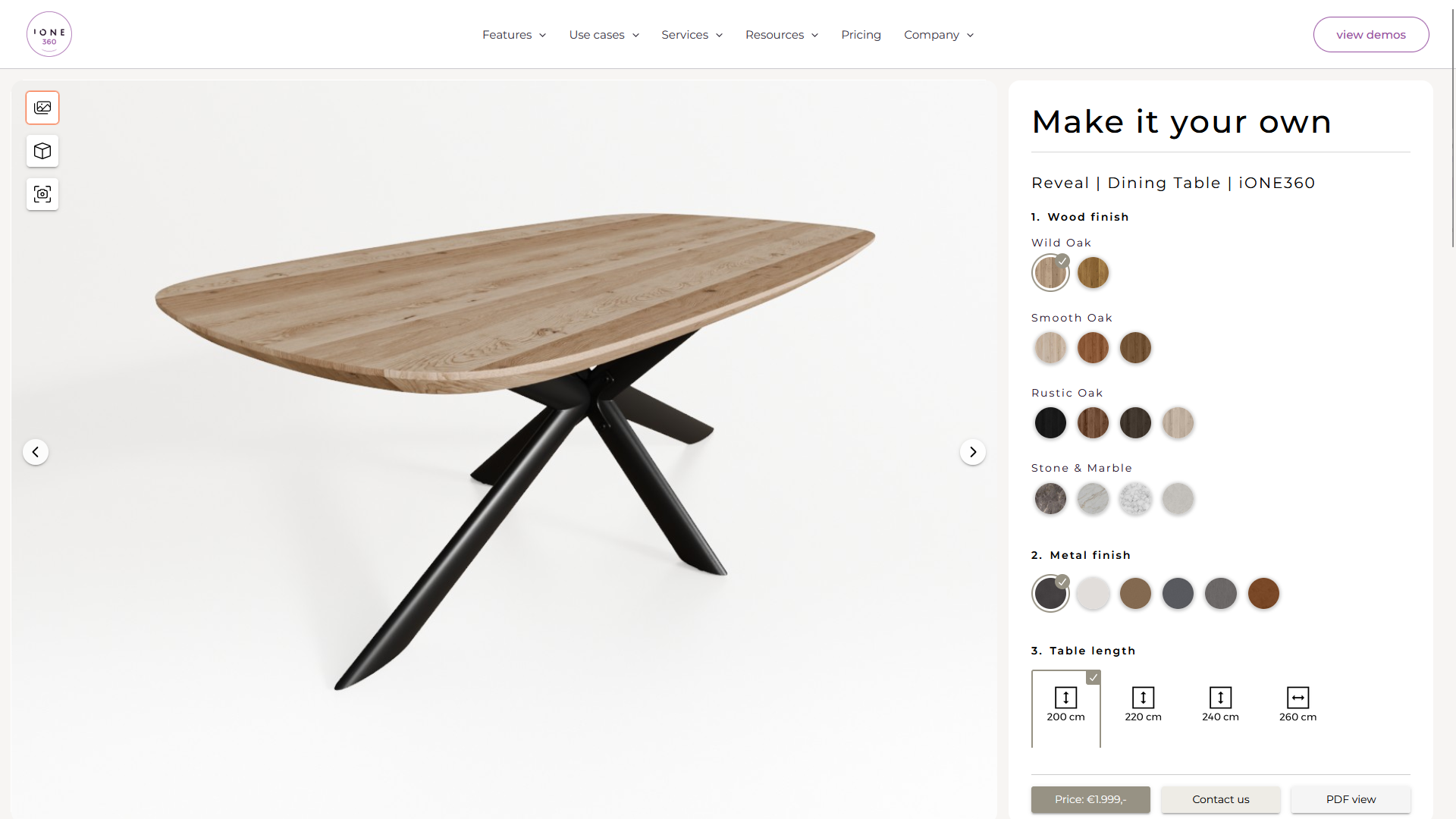
Turn product choices into a clear, interactive buying experience. With the iONE360 website product configurator, customers can explore materials, colours and options in 3D, while your product rules and pricing keep every selection connected to what you actually sell.
Explore the demosFor furniture, home and decor brands, manufacturers and retailers.
FROM BROWSING TO CONFIGURING
What is a website product configurator?
A website product configurator is an interactive tool that lets visitors customise a product directly on your website. Instead of choosing from static pictures and long option lists, customers select the features they want and see the configured result.
Our 3D configurator adds a visual layer to those choices. With iONE360 your product data, compatibility rules, pricing and visualisation work together, guiding the customer towards a configuration that can continue into your agreed cart, quote or sales process.

iONE360 offers different kind of plugins for WooCommerce, WordPress, Magento, Shopify and more.
Make complex products easier to buy
Show the exact combination.
Let customers compare upholstery, finishes and product options before they commit. Interactive 3D views make differences easier to understand than a list of variant names.
Guide every choice.
Present the options that belong together. Configuration rules help customers navigate complex products and reduce the need to clarify incompatible selections afterwards.
Keep the specification useful.
Connect the selected product, options and price to your next sales step. The exact handoff is scoped around your website, commerce platform and business systems.
YOUR WEBSITE. YOUR CUSTOMER JOURNEY.
Add a product configurator to your existing website
You do not need to start with a new website. Choose the integration route that fits your current platform and the level of control you need. iONE360 supports commerce plugins, a universal JavaScript embed and API-based implementations.
Commerce plugins
Use a dedicated integration for supported platforms such as Shopify, WooCommerce, WordPress and Magento. Connect the visual experience to your existing pages.
Universal web embed
Bring configuration into a custom website or web application with the iONE360 JavaScript bundle. Match the experience to your brand and agree how the selected product continues through your sales journey.
Headless and API integration
Build a tailored interface or connect to a broader commerce architecture. The same configuration platform can support custom frontends and integration with product and business data.
Find the right website product configurator for your platform

Sell configured products through WooCommerce, with selected options and pricing carried into the shopping cart.

Bring interactive product configuration to Magento product pages and connect it to the purchase journey.

Add a visual product configurator to your WordPress website and present customisable products in 3D.

Bring 3D product configuration to your Shopify store and let customers explore and customise products before buying.

BUILT FOR FURNITURE COMPLEXITY
One product. Many possibilities.
A chair can have different fabrics, arms and leg finishes. A table can vary in size, top and base. A modular sofa adds another layer of combinations. iONE360 brings those choices into a guided website experience, with the underlying rules defined around your catalogue.
Extend the journey with photorealistic product rendering, augmented reality or a 3D room planner. These modules help customers see configured products on their own or together in a room.
Discover the platformFrom your catalogue to your website
Start with a representative product and a clear customer journey. We help define the configuration, prepare the visual content and connect the experience to your website.
01
Prepare the product
Share product specifications, options, materials and available 3D assets. Existing models can be reviewed for suitability, or our team can help create the content.
02
Define rules and pricing
We set up permitted combinations and the pricing logic for the intended channel. Next, we link the product configuration to the corresponding 3D assets.
03
Integrate and validate
Choose a plugin, embed or API route. Review branding, mobile behaviour and the cart or quote handoff before launching the website product configurator.
Frequently asked questions about our website product configurator
Can I add a configurator to a website I already have?
Yes. iONE360 offers plugins for supported platforms and JavaScript or API routes for custom websites. The best approach depends on your platform, product complexity and the sales flow you want to connect.
What is the difference between a 3D viewer and a product configurator?
A 3D viewer lets visitors inspect a model. A product configurator lets them change defined product options. A rules-based configurator also manages permitted combinations and can connect the selected specification to pricing and your sales process.
Do customers need to install an app?
The website configurator runs in the browser. Customers can configure on your site without installing a separate application.
Can the configurator match our website branding?
Yes. The presentation can be adapted to your brand and customer journey. A custom or headless implementation gives you further control over the interface.
Can it connect to a cart, quotation or ERP system?
Yes, depending on the integration scope. The WooCommerce and Magento plugins support configured products in the cart. Quote, order and business-system connections can be defined through the broader integration options.

