

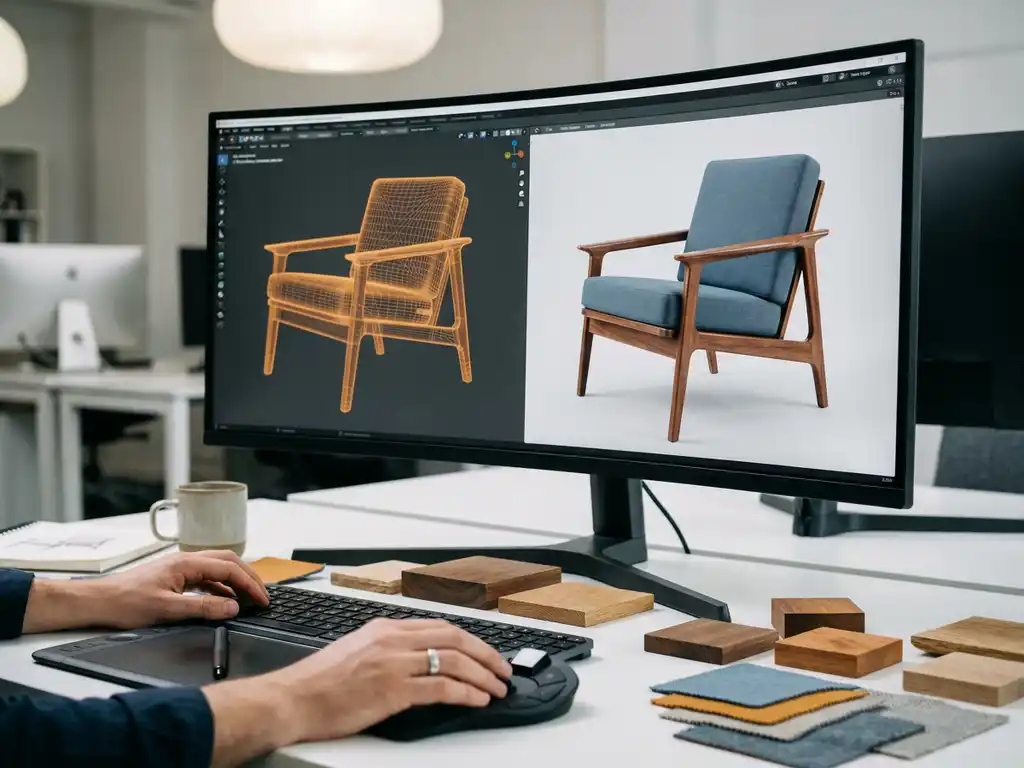
To make a 3D model of furniture, a designer creates a digital representation of the piece using 3D modeling software, defining its geometry, dimensions, materials, and surface textures. The process typically starts with reference drawings or technical specifications and results in a file that can be rendered, animated, or integrated into configurators and AR experiences. The sections below walk through the key questions furniture professionals ask when getting started with 3D modeling.
What software is used to create 3D furniture models?
The most widely used software tools for creating 3D furniture models include Blender, Autodesk 3ds Max, Cinema 4D, Rhinoceros 3D, and SketchUp. Each tool serves a different purpose: Blender and 3ds Max are popular for high-detail visualization and rendering, while SketchUp and Rhino are often preferred for architectural and space-planning workflows. The right choice depends on the intended output and your team’s technical background.
For furniture manufacturers specifically, the output format matters as much as the tool itself. Models destined for real-time configurators or room planning software need to be optimized for web performance, which means polygon counts, texture sizes, and file formats all play a role. Common export formats include glTF, GLB, OBJ, and FBX, depending on the platform receiving the model.
Many studios also combine tools: a designer might build the base geometry in 3ds Max, apply materials in Substance Painter, and then export to a web-based platform for real-time use. Knowing the final destination of the model before you start saves significant rework later.
What are the main methods for building a 3D furniture model?
There are three primary methods for building a 3D furniture model: polygon modeling, CAD-based modeling, and photogrammetry. Polygon modeling is the most flexible and widely used approach for visual output. CAD-based modeling is preferred when engineering precision matters. Photogrammetry uses photographs of a physical object to reconstruct a 3D mesh automatically.
- Polygon modeling: The designer manually constructs the shape by manipulating vertices, edges, and faces. This gives full creative control and produces clean models optimized for rendering and real-time use.
- CAD-based modeling: Used in manufacturing environments where exact measurements and tolerances are critical. Software like SolidWorks or Fusion 360 produces parametric models that can be converted to visual 3D assets.
- Photogrammetry: A physical product is photographed from many angles, and software reconstructs a 3D mesh from those images. Useful for rapid digitization but often requires significant cleanup before the model is production-ready.
For furniture brands managing large product catalogues, polygon modeling combined with a structured asset pipeline tends to deliver the best balance of visual quality and scalability. Starting from technical drawings or CAD data reduces errors and speeds up the modeling process considerably.
How detailed does a 3D furniture model need to be?
The level of detail a 3D furniture model needs depends entirely on how it will be used. A model for print-quality rendering requires far more detail than one used in a real-time web configurator or room planning tool. For real-time applications, models are typically optimized to a lower polygon count while relying on high-resolution texture maps to simulate fine surface details.
In practice, furniture models used in interactive tools are built in at least two versions: a high-poly version for generating photorealistic packshot images, and a low-poly version for real-time use in configurators, AR, and 3D room planning software. The low-poly version is carefully optimized so it loads quickly in a browser without sacrificing visual quality.
Material accuracy is often more important than geometric complexity. A sofa with a convincing fabric texture and accurate stitching detail will look more realistic in a configurator than a highly complex mesh with a flat material applied to it. Investing in quality PBR (physically based rendering) materials pays off significantly in the final visual output.
How long does it take to make a 3D model of a piece of furniture?
Creating a 3D model of a furniture piece typically takes between one and five days, depending on the complexity of the product, the quality required, and the experience of the modeler. A simple dining chair with a single fabric option might take one to two days. A fully configurable modular sofa with multiple frame options, arm styles, leg variants, and fabric choices can take a week or more to model properly.
The timeline also depends on the quality of the reference material provided. Clean technical drawings, CAD files, and physical samples all help the modeler work faster and more accurately. Poor or missing references are one of the most common causes of rework and delays in furniture 3D modeling projects.
For manufacturers with large catalogues, building an efficient asset pipeline is more valuable than optimizing individual model production time. Standardized workflows, reusable component libraries, and clear naming conventions reduce production time per model as the catalogue grows.
Can 3D furniture models be used directly in AR and online configurators?
Yes, 3D furniture models can be used directly in AR experiences and online configurators, but they need to be prepared and optimized for those environments first. Raw modeling files are rarely production-ready for real-time use. They typically need to be reduced in polygon count, have their textures baked and compressed, and be exported in a compatible format such as glTF or USDZ for AR on iOS devices.
For AR specifically, the model needs to behave correctly at real-world scale, respond to lighting conditions in the user’s environment, and load quickly on a mobile device. These requirements mean that AR-ready models are a specific deliverable, not simply a by-product of the standard modeling process.
Online configurators add another layer of complexity: the model must support visual switching between variants such as fabrics, colors, and configurations without reloading the entire scene. This requires the model to be structured with that interactivity in mind from the start, with materials and components organized so that individual elements can be swapped dynamically. A well-built 3D room planning tool depends on exactly this kind of model preparation to deliver a smooth, responsive experience for the end user.
What’s the difference between 3D modeling and 3D product configuration?
3D modeling is the process of creating a digital 3D asset of a product. 3D product configuration is the process of using that asset interactively, allowing users to change options such as color, material, size, or component combinations and see the result in real time. Modeling is a production task; configuration is a sales and commerce tool built on top of that production work.
Think of it this way: a 3D model is the raw ingredient, and a configurator is the application that puts it to work. A single well-built model can power a product detail page, a packshot generator, an AR viewer, and a room planner simultaneously, provided it has been prepared correctly for each context.
The distinction matters for furniture manufacturers because the business value lies in the configuration layer, not the model itself. A photorealistic 3D model sitting in a file folder generates no commercial return. The same model embedded in a product configurator with business rules, pricing logic, and ordering capabilities directly influences conversion rates, order values, and customer confidence.
- 3D modeling: Building the digital asset with accurate geometry, materials, and textures.
- Asset preparation: Optimizing the model for real-time use, AR, and different output formats.
- Configuration setup: Defining the rules, variants, and logic that govern how the product can be customized.
- Platform integration: Embedding the configurator into a webshop, dealer portal, or room planning environment.
- Commerce output: Connecting configuration choices to pricing, lead times, and order processing.
How iONE360 Helps You Get More From Your 3D Furniture Models
Building a great 3D furniture model is only the first step. The real value comes from putting that model to work across every sales channel, and that is exactly where we come in. iONE360 is a complete visual commerce platform built specifically for the furniture and home furnishings industry, with over 45 years of industry expertise behind it.
Here is what we offer once your 3D assets are ready:
- Interactive product configuration: Let customers configure your products in real time, across millions of possible variants, with pricing and business rules built in.
- Automatic packshot generation: Generate high-quality product images for every configuration automatically, eliminating costly photoshoots.
- AR visualization: Let customers place your furniture in their own space using their smartphone, no app download required.
- 3D room planning: Give customers a full room planning experience where they can combine, configure, and order multiple pieces together, increasing buying intent and average order value.
- Seamless integration: Connect directly with your PIM, ERP, CMS, or webshop for a consistent omnichannel experience.
Whether you are a manufacturer looking to scale your visual content, a retailer wanting to modernize the buying experience, or a brand aiming for consistent presentation across all dealer channels, iONE360 gives you one platform to do it all. Talk to our team and find out how we can put your 3D models to work.
Frequently Asked Questions
How do I know if my existing 3D models are good enough to use in a configurator or AR experience?
The best way to assess your existing models is to check three things: polygon count, texture quality, and file structure. A model suitable for real-time use should typically stay under 50,000–100,000 polygons, use PBR-compatible textures, and have its materials and components logically separated so variants can be swapped dynamically. If your models were built purely for rendering or print, they will likely need optimization before they are ready for interactive use — but in most cases, the base geometry can be reused and adapted rather than rebuilt from scratch.
What reference materials should I prepare before commissioning 3D furniture models?
The more reference you provide, the faster and more accurate the modeling process will be. Ideally, you should supply dimensioned technical drawings (top, front, and side views), CAD files if available, physical material samples or high-resolution fabric scans, and close-up photographs of construction details such as joints, legs, stitching, and cushion profiles. If physical samples can be shared with the studio, that is even better. Gaps in reference material are the single most common cause of revision rounds and project delays.
What is the difference between a glTF and a USDZ file, and which one should I use?
glTF (and its binary variant GLB) is the most widely supported format for real-time 3D on the web and is used by the majority of online configurators, room planners, and WebAR platforms. USDZ is Apple’s format, used specifically for AR Quick Look on iOS devices — it allows iPhone and iPad users to place a 3D model in their space directly from a browser or product page without downloading an app. For most furniture brands, you will need both: glTF for web-based experiences and USDZ for native iOS AR. A well-prepared asset pipeline can export both from the same source model.
Can one 3D model support multiple fabric or finish options, or do I need a separate model for each variant?
A single well-structured 3D model can support an unlimited number of material variants without requiring separate model files for each one. This is achieved by separating the geometry from the materials during the modeling and configuration setup phase — the model’s surfaces are mapped so that fabric, color, or finish textures can be swapped dynamically at runtime. This approach is far more scalable than maintaining individual files per variant, especially for furniture ranges with dozens or hundreds of fabric options. The key is ensuring the model is built with this material-switching logic in mind from the outset.
What are the most common mistakes furniture brands make when starting a 3D modeling project?
The most frequent mistakes are starting without a clear brief for how the models will ultimately be used, providing incomplete or inconsistent reference materials, and treating 3D modeling as a one-time production task rather than a structured, reusable asset pipeline. Brands also commonly underestimate the difference between a rendering-quality model and a real-time-ready model, leading to costly rework when they try to deploy assets in a configurator or AR tool. Defining your end-use requirements — web configurator, AR, room planner, print — before production begins will save significant time and budget.
How should I manage and organize 3D assets across a large product catalogue?
For large catalogues, a consistent naming convention, folder structure, and version control system are essential from day one. Each model should be stored alongside its source files, exported formats, texture maps, and a brief specification sheet noting its polygon count, intended use cases, and export settings. Many furniture manufacturers integrate their 3D assets directly into a PIM (Product Information Management) system so that models are linked to the correct product data and can be distributed to multiple sales channels from a single source of truth. Investing in this infrastructure early prevents the catalogue from becoming unmanageable as it scales.
How do I get started if my brand currently has no 3D assets at all?
The most practical starting point is to prioritize your best-selling or most-configured products and build those models first, rather than attempting to digitize your entire catalogue at once. From there, use those initial models to validate your workflow — testing them in your intended platform, gathering feedback, and refining your production brief before scaling up. Many furniture brands partner with a specialist 3D production studio or a visual commerce platform like iONE360 that can handle both asset creation and platform deployment, giving you a clear path from zero assets to a fully operational configurator without managing multiple vendors.