

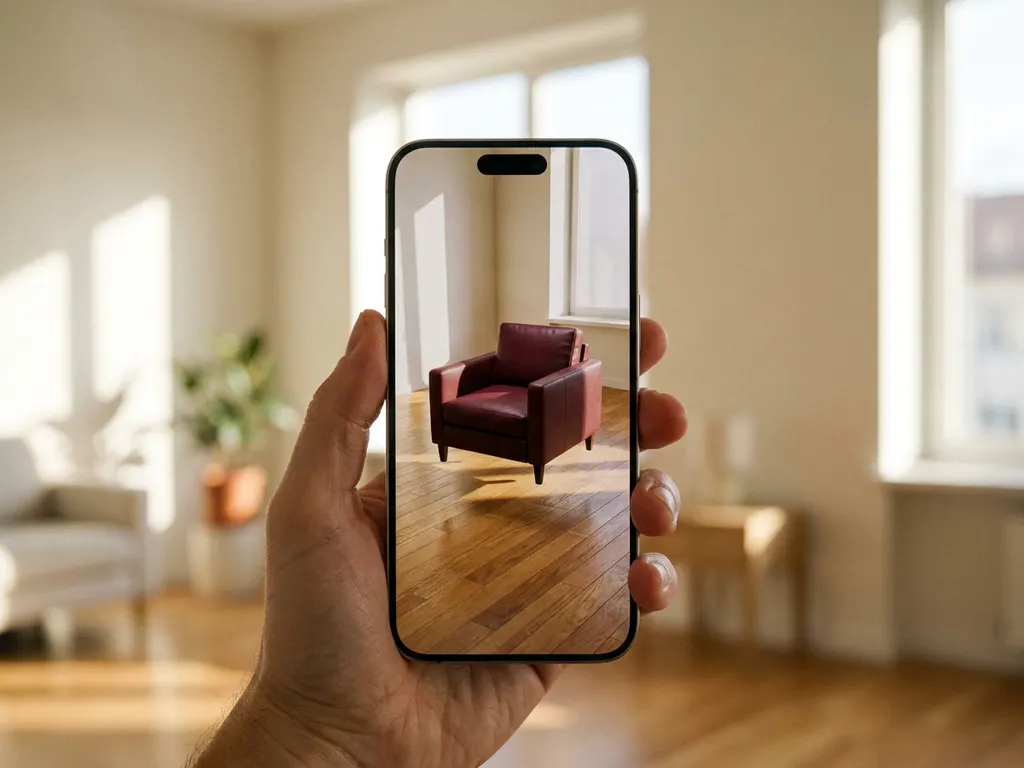
Wondering whether that sofa will actually fit, or whether it will clash with your existing decor? You can now view furniture in your room before buying, without leaving your home. Modern tools range from AR apps on your phone to full 3D room planners and interactive configurators, making it easy to visualize furniture in your space before committing to a purchase. Consumers gain real purchase confidence, while retailers using these tools consistently see fewer returns and higher order values.
What is furniture visualization technology?
Furniture visualization technology is software that creates realistic 3D representations of furniture and room layouts. It allows customers to see how products will look in their space before purchasing, using techniques like augmented reality (AR), 3D modeling, and interactive configurators to provide accurate visual previews.
This technology has evolved significantly in recent years, moving from basic 2D floor plans to sophisticated 3D environments that account for lighting, textures, and spatial relationships. Modern furniture visualization tools can handle complex product customization, showing different fabrics, colors, and configurations in real time. The most advanced systems integrate with product databases to ensure accurate pricing, availability, and specifications for each visualized item.
The technology serves both consumers and furniture retailers by reducing uncertainty in the buying process. Customers gain confidence in their purchases, while retailers see reduced return rates and increased order values when shoppers can visualize products in context. Furniture retailers working with advanced visualization platforms have reported significant reductions in product return rates after introducing interactive 3D configurators, as customers arrive at checkout with a clearer, more confident understanding of what they are buying. Shoppers who use room planning tools to preview furniture in their own space consistently report higher satisfaction with their purchases and fewer regrets about fit or style.
How does AR let you see furniture in your room before buying?
Augmented reality (AR) for furniture placement uses a smartphone or tablet camera to overlay 3D furniture models onto a real room in real time. The app scans the space, identifies flat surfaces like floors and walls, then anchors virtual furniture to those surfaces so you can walk around and view pieces from different angles.
The process starts when you point your device’s camera at the room where you want to place furniture. AR software analyzes the camera feed to understand the room’s dimensions, lighting conditions, and surface planes. Once the app maps your space, you can select furniture items from a catalog and place them virtually in your room. The software maintains the correct scale and perspective as you move around, creating a realistic preview of how the furniture will look.
Most AR furniture apps also account for lighting conditions in your room, adjusting shadows and reflections to make virtual furniture appear naturally integrated with your existing environment. Some advanced applications even detect obstacles like existing furniture or architectural features to prevent virtual items from floating in unrealistic positions.
How to see furniture in your room: a step-by-step guide
Using a furniture visualization tool for the first time is straightforward. The process follows a logical sequence that takes you from preparing your space to placing and customizing virtual pieces, and no specialist skills are required. Most tools work directly in a mobile browser, so you can get started without downloading anything.
- Measure your room. Record the length, width, and height of the space, plus doorway clearance, so you have accurate figures ready before you begin.
- Choose your tool type. Use an AR app if you want to view a single item in your room quickly. Choose a 3D room planner if you are planning a full room redesign with multiple pieces.
- Open the app or web tool. Launch the tool on your smartphone or in your browser. Many modern visualization tools work without a download, lowering the barrier to entry for first-time users.
- Scan your room or enter your measurements. Point your camera at the floor and walls to let the app map your space automatically, or type in your measurements manually for greater precision.
- Browse the catalog and select a piece. Find the furniture item you want to preview and tap or click to place it in your virtual room.
- View, adjust, and customize. Walk around the virtual piece from multiple angles, reposition it, and switch between color, fabric, and size options before adding to your cart.
What’s the difference between AR apps and 3D configurators?
AR apps overlay virtual furniture onto a real room using a phone camera, while 3D configurators create complete virtual room environments where you can design layouts from scratch. AR focuses on placing individual items in existing spaces, whereas configurators let you build entire room designs with multiple furniture pieces, wall colors, and decorative elements.
AR applications excel at answering the specific question “Will this sofa fit in my living room?” They’re ideal for visualizing single purchases or checking if a particular piece works with your current setup. The experience feels immediate and personal because you’re seeing virtual furniture in your actual space with your real lighting and surroundings.
3D room configurators offer broader design capabilities, allowing you to experiment with complete room makeovers. You can change wall colors, flooring, add multiple furniture pieces, and create cohesive design schemes. These tools often include measurement features, budget tracking, and the ability to save and share different design options. Advanced room planning software combines both approaches, letting you configure individual products while designing complete room layouts.
Beyond furniture: visualizing rugs, wall colors, and decor
Advanced room planners go well beyond placing a single sofa or dining table. With the right platform, shoppers can visualize furniture and decor in your space as a complete interior scheme, previewing area rugs scaled precisely to their floor dimensions, testing wall paint colors under different lighting conditions, and layering decorative accessories to create a cohesive look before committing to any purchase. iONE360’s platform supports exactly this kind of full-room visualization, giving both consumers and retailers the confidence that every element of a design works together.
Which companies help you visualize furniture in your space?
A growing number of companies offer tools that let you view furniture in your room, from major retailers with their own branded apps to specialist technology providers who power white-label solutions for furniture brands. Understanding the difference between these two categories helps you choose the right tool for your needs.
Retailer-built AR tools
Several of the world’s largest furniture and home retailers have invested in their own view-in-your-room tools:
- IKEA Place uses AR to let shoppers place true-to-scale IKEA products in their home using a smartphone camera, with automatic size and scale adjustment.
- Wayfair offers both an AR view-in-room feature for individual products and a 3D room design tool for planning complete spaces using items from its catalog.
- West Elm provides an AR tool within its app that lets customers see how furniture and decor pieces will look in their own rooms before purchasing.
- Ashley HomeStore includes a room visualization feature that allows shoppers to preview furniture in their space directly from product pages.
- Amazon AR View lets shoppers see how products will look in their home directly through the Amazon app, making it one of the most widely accessible view-in-your-room tools available.
Each of these tools is tied to a single retailer’s catalog, which means you can only preview products that brand sells. They are excellent for checking whether a specific item fits and suits your space, but they do not allow cross-retailer comparisons.
Third-party visualization platform providers
Beyond retailer-built apps, a category of specialist technology companies provides white-label visualization platforms that furniture brands can deploy under their own name. These solutions are typically more configurable, more deeply integrated with product catalogs, and more consistent with a retailer’s brand identity than in-house tools built from scratch. iONE360 is the leading specialist in this space, offering white-label 3D room planners and product configurators purpose-built for the furniture and interior market. Unlike single-retailer AR apps, iONE360 provides a fully branded, brand-consistent experience with deep product catalog integration, real-time pricing, and advanced customization options covering fabric, color, size, and finish.
Comparison of popular furniture visualization tools
| Tool | Tool Type | Device | Catalog Scope | Customization | Best For |
|---|---|---|---|---|---|
| IKEA Place | AR App | iOS / Android | IKEA only | Limited | Consumers |
| Wayfair View in Room | AR App + 3D Planner | iOS / Android / Web | Wayfair only | Limited | Consumers |
| Amazon AR View | AR App | iOS / Android | Amazon catalog | No | Consumers |
| Houzz | AR App + 3D Planner | iOS / Android / Web | Multi-brand | Limited | Consumers / Designers |
| iONE360 | 3D Configurator + Room Planner | Web + Mobile | Retailer-specific (white-label) | Advanced (fabric, color, size, pricing) | Furniture retailers & e-commerce brands |
For furniture retailers seeking a fully branded, configurable room planning experience, iONE360 offers the most comprehensive platform on this list.
How accurate is it to view furniture in your room virtually?
Virtual furniture placement is generally accurate within 1-2 inches for dimensions and scale when used properly. Accuracy depends on how well the space is measured initially and the quality of the visualization software. Most tools provide measurements reliable enough for confident purchasing decisions.
The accuracy of AR furniture placement has improved dramatically as smartphone cameras and processing power have advanced. Modern devices can detect room dimensions and surface planes with impressive precision, especially when you take time to properly scan your space before placing virtual furniture. However, accuracy can vary based on lighting conditions, room complexity, and how steadily you hold your device during scanning.
For the most accurate results, measure your room manually and input exact dimensions when the software allows it. This gives the visualization tool a solid foundation for placing furniture at correct scales. Some advanced systems also let you adjust placement manually if the automatic detection isn’t perfect, ensuring you get reliable previews that translate well to real-world purchases.
What do you need to use furniture visualization tools?
To use furniture visualization tools, you need a smartphone or computer with internet access. For augmented reality (AR) features specifically, your device must support AR capabilities — this includes most smartphones manufactured after 2017. Some advanced room planning tools work better on tablets or computers with larger screens.
For AR furniture placement, your phone needs a camera and sufficient processing power to run AR applications smoothly. iOS devices require ARKit support (iPhone 6s and newer), while Android devices need ARCore compatibility. Most modern smartphones meet these requirements, but older devices may experience slower performance or limited functionality.
Beyond the device requirements, having your room dimensions measured beforehand improves accuracy significantly. Some tools also benefit from good lighting conditions for optimal camera performance. Professional room planning software may require creating an account and potentially uploading floor plans for the most comprehensive design experience.
How iONE360 helps with furniture visualization
iONE360 is a specialist furniture visualization platform built on over 45 years of furniture industry expertise. We provide comprehensive room planning software that transforms how customers design and furnish their living spaces. Our advanced 3D visualization platform combines room planning with integrated product configuration, allowing customers to not only place furniture in virtual rooms but also customize each piece on the spot, choosing different fabrics, colors, and specifications, while seeing real-time pricing and lead times.
Business results retailers achieve with 3D visualization
Retailers who implement photorealistic 3D visualization consistently see measurable improvements across their key performance metrics. Shoppers who interact with interactive configurators to view furniture in your room before buying show up to 64% higher buying intent compared to those viewing static product images. Furniture retailers commonly report a 20-30% reduction in return rates after implementing interactive visualization, as customers arrive at checkout with a precise understanding of how a piece will look and fit in their space. Average order values also tend to rise, because shoppers who can see and configure a complete room are more likely to add complementary pieces to their purchase.
We offer two flexible approaches to meet different business needs:
- Bespoke, white-labeled room planners built specifically for your platform and brand
- HomeDecoHub, our ready-to-use room planning marketplace powered by proven furniture configurator technology
- Seamless integration with existing business systems for streamlined operations
- Photorealistic 3D visualizations that increase buying intent by up to 64%
How iONE360 compares to retailer-built tools
Retailer-built AR apps are designed to serve a single brand’s catalog and offer limited customization. iONE360 takes a fundamentally different approach: we deliver a fully white-labeled, brand-consistent experience that integrates deeply with your product catalog, supports real-time configuration of fabric, color, size, and pricing, and scales cost-effectively alongside your business. Unlike in-house tools that require significant ongoing development investment, our platform is pragmatically scalable and built specifically for the furniture and interior market, meaning you benefit from specialized expertise that a general-purpose technology team cannot replicate.
Getting started with iONE360
Our platform eliminates purchasing uncertainty while reducing returns and increasing order values, combining cost-effective deployment with pragmatic scalability so furniture retailers of any size can integrate advanced visualization without overhauling their existing infrastructure. Ready to see how advanced room visualization can transform your furniture business? Contact us to discover how our room planning software can boost your sales and customer satisfaction.
Frequently Asked Questions
What should I do if the AR app isn't detecting my room surfaces correctly?
Ensure you have adequate lighting and slowly move your phone in a steady sweeping motion to help the app map your space. Clear any clutter from floors and surfaces, and try restarting the app if detection issues persist. Most AR apps work best in well-lit rooms with distinct surface textures that the camera can easily identify.
Can I use furniture visualization tools to plan an entire room makeover with multiple pieces?
Yes, 3D room configurators are specifically designed for complete room planning with multiple furniture pieces, wall colors, and decor elements. Unlike AR apps that focus on single items, these tools let you create comprehensive layouts, save different design options, and see how all pieces work together before making any purchases.
Can I check if furniture will fit my room, match my existing colors, and suit my materials before buying?
Yes, and this is precisely what modern AR tools and 3D configurators are designed for. You can check spatial fit with placement accuracy to within 1-2 inches, preview fabric and color options rendered in your actual room lighting, and compare material finishes side by side before committing to a purchase. iONE360-powered configurators allow real-time switching between fabric, color, and size options, so you can explore every variation of a piece until you find the combination that works perfectly in your space.
Do I need to download an app to see furniture in my room, or can I use a browser?
You do not always need to download an app. Many modern visualization tools, including browser-based room planners, work directly on a mobile browser without requiring any installation, which significantly lowers the barrier to entry for first-time users. AR features that rely on your device camera may still require an app on some platforms, but a growing number of web-based tools deliver a full room planning experience without a download.
How do I ensure the furniture colors and materials will look accurate in my actual room lighting?
Take photos of your room at different times of day and compare them with the visualization tool’s lighting options. Many advanced tools adjust for natural and artificial lighting conditions, but you should also request fabric samples or visit showrooms when color accuracy is critical for your design decisions.
What's the best way to measure my room for the most accurate furniture placement?
Use a measuring tape to record length, width, and height of your room, plus the dimensions of doorways, windows, and existing furniture. Input these exact measurements into the visualization tool rather than relying solely on camera-based detection. Also measure the path from your front door to ensure new furniture can actually be delivered to the room.
Are there any hidden costs or limitations when using retailer visualization tools?
Most retailer visualization tools are free to use, but they typically only show products from that specific retailer’s catalog. Some advanced features like saving multiple room designs or accessing premium catalogs may require creating an account. The main limitation is being restricted to one brand’s product selection rather than comparing across multiple retailers.
Can furniture visualization tools help me avoid common decorating mistakes?
Absolutely. These tools help you avoid scale issues, color clashes, and traffic flow problems by letting you test different arrangements virtually. You can experiment with furniture placement, check clearance spaces around pieces, and see how new items complement existing decor before committing to purchases, preventing costly decorating mistakes.
What should I do if I'm still unsure about a furniture purchase after using visualization tools?
Consider visiting a showroom to see the actual piece, request fabric samples for tactile evaluation, or look for retailers with generous return policies. Some companies also offer virtual design consultations where professionals can review your visualization designs and provide expert guidance before you make final purchasing decisions.