

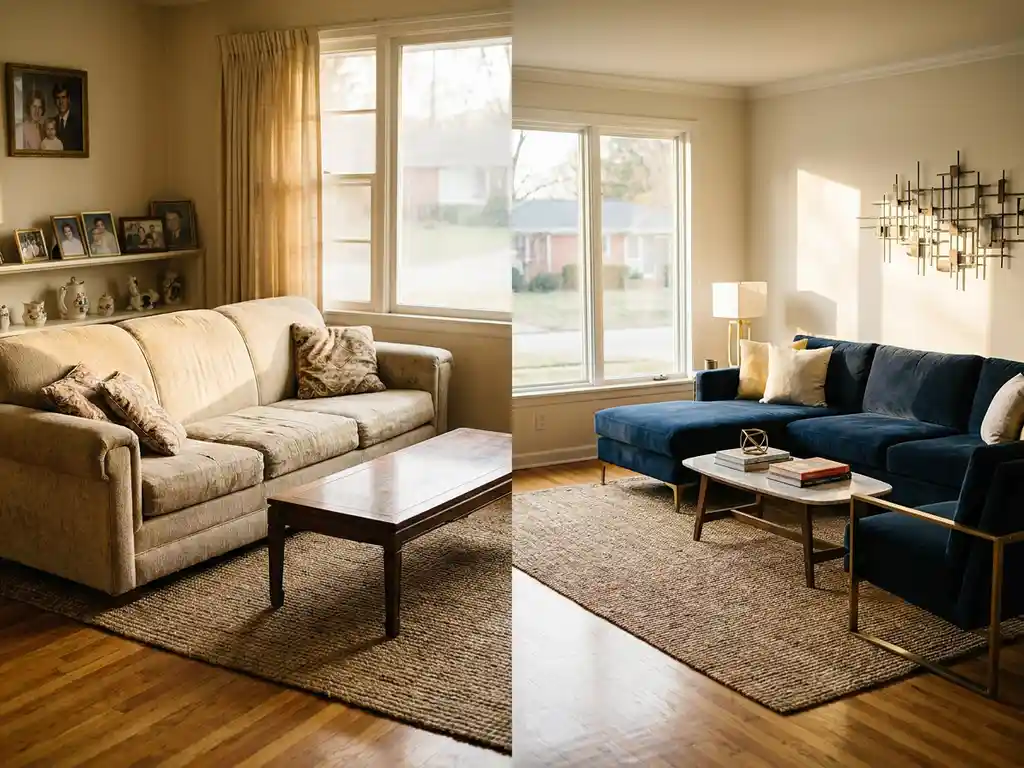
Wondering if ChatGPT can redesign your room? ChatGPT can offer text-based design advice — but it cannot create the visual layouts most people actually need. For that, you need specialized 3D room planning software. While ChatGPT room design advice is a useful starting point for gathering ideas, it falls well short of what dedicated visualization tools deliver. If you want to see how your space will actually look before you buy, you need a platform built for exactly that purpose — like iONE360’s room planner.
What can ChatGPT actually do for room design?
ChatGPT can provide design concepts, color palette suggestions, style recommendations, and furniture arrangement ideas through detailed text descriptions. It excels at explaining design principles, suggesting room layouts based on dimensions, and helping brainstorm creative solutions for space challenges.
ChatGPT’s strengths in room design include offering personalized advice based on your preferences, explaining why certain design choices work well together, and providing step-by-step guidance for organizing spaces. It can suggest furniture pieces that complement each other, recommend lighting solutions, and help you understand design principles like balance and proportion.
However, ChatGPT works entirely through text communication. You’ll receive detailed written descriptions of design ideas, but you’ll need to visualize these concepts yourself or use other tools to create actual visual representations.
Why can’t ChatGPT create visual room designs?
ChatGPT is a text-based AI model that processes and generates written content. It cannot create floor plans, accurate 3D models, or reliable visual mockups of room designs — and the way it handles images is far more limited than most people realize.
While ChatGPT-4o can now generate rough visual mockups from a photo of your room, these images come with serious limitations for actual ChatGPT room design use. It cannot measure your actual wall lengths or verify that furniture physically fits your space. It may place a sofa that looks right in the image but is 30 cm too wide for your wall — or propose a console table in front of a radiator, because it cannot see your actual room. It cannot render real products from a furniture catalog, so what you see is an approximation, not a representation of anything you can actually buy. And the output is a flat, static image you cannot interact with, adjust, or reconfigure. These are exactly the gaps that dedicated 3D room planning software is built to solve — and why iONE360 exists.
Real limitations ChatGPT users run into
- Furniture that does not fit — ChatGPT may suggest a sofa that sounds perfect but is 30 cm too wide for your wall, because it has no way to verify your actual room measurements.
- Layouts that ignore architecture — It may propose placing a console table in front of a radiator or a wardrobe that blocks a door swing, because it cannot see your room.
- No way to check before you buy — Without an accurate visual render, you only discover a mismatch after the furniture has been delivered.
These failure modes are not edge cases — they are the predictable result of asking a text-based AI to do the job of specialized 3D room planning software. The good news is there is a smarter workflow that uses both.
How to use ChatGPT for room design: a step-by-step workflow
ChatGPT room design advice works best when it is treated as the brainstorming phase of a larger process — not the final output. Here is a practical five-step workflow that takes you from initial ideas all the way through to a finished, photorealistic 3D layout in iONE360.
- Describe your room to ChatGPT. Share your room dimensions, any existing furniture you want to keep, and your style goals. Ask for initial design concepts, layout principles suited to your room size, and a starting direction. The more specific you are, the more useful the output.
- Collect design ideas. Ask ChatGPT for color palette suggestions, furniture style recommendations, and layout principles. At this stage you are building a creative brief — a set of ideas and preferences you can take into a visual tool.
- Use example prompts to get better results. The quality of ChatGPT’s advice depends heavily on how you ask. Use the ready-to-try prompts below to get more actionable suggestions.
Example prompts to try in ChatGPT:
- My living room is 4 meters wide and 6 meters long with one large south-facing window. Suggest a furniture layout for a modern minimalist style.
- Act as an interior designer. I have a dark bedroom with low ceilings. What colors and furniture choices would make it feel larger and brighter?
- I want to redesign my home office for productivity. I have a desk, a bookshelf, and two chairs. How should I arrange them and what should I add?
- Here is my current living room setup: grey corner sofa, oak coffee table, white walls. Suggest three color accent options and explain why each works.
These prompts give you a solid brief — but to see the results visually, you will need to bring them into a 3D room planner like iONE360.
- Identify the limitations you will hit. At some point ChatGPT cannot go further. It cannot show you how the room will actually look, cannot verify that furniture fits, and cannot render real products from a catalog. This is the natural handoff point.
- Transfer your ideas into iONE360. Use the concepts gathered from ChatGPT as your brief inside iONE360’s 3D room planner to produce an accurate, photorealistic layout — one you can interact with, adjust in real time, and view in augmented reality before making a single purchase.
Can AI help you redesign a room with your existing furniture?
Most people redecorating a room are not starting from scratch — they have a sofa they love, a dining table that works, and want to build around what they already own. This is one of the most common scenarios behind the question “can ChatGPT redesign my room?” and it is worth addressing directly.
ChatGPT can help at the ideas stage. You can describe your existing pieces — dimensions, materials, colors — and ask for complementary additions, layout suggestions, or style directions. It is genuinely useful for this kind of conversational brainstorming. But it cannot show you how the room will actually look with your existing sofa repositioned and a new armchair added beside it. That requires a visual tool.
iONE360 allows users to input custom furniture dimensions or select matching catalog items, place existing pieces accurately in a 3D space, and experiment with new additions before purchasing. Whether you are working around a beloved corner sofa or a dining set you inherited, you can build an accurate 3D model of your current room and test changes with confidence. For consumers and furniture retailers alike, this is where ChatGPT room design ideas become a real, actionable plan — and where 3D room planning software pays for itself.
Should you use ChatGPT or specialized design software?
Use ChatGPT when…
- You are in the early brainstorming phase and want creative inspiration without committing to anything.
- You want to explore color palettes or style directions in plain language.
- You need help articulating your design vision before speaking to a professional or starting a visual plan.
- You want quick, low-effort ideas to bring to a showroom conversation.
Use 3D room planning software when…
- You need to see how furniture will actually look in your specific room at the correct scale.
- You are making purchasing decisions and need accurate proportions and real product representations.
- You want to share a realistic visual plan with a client, a family member, or a sales team.
- You need photorealistic renders or augmented reality previews to build confidence before buying.
The most effective approach is not either/or — it is sequential. Use ChatGPT to develop your design concepts and gather ideas, then bring those ideas into iONE360 to create accurate, photorealistic visual plans. This combined workflow is quickly becoming the professional standard for both consumers and furniture retail teams.
What is the best 3D room planning software for room redesign?
Starting with a free tool like ChatGPT makes complete sense — it costs nothing and can generate a surprising number of useful design ideas in minutes. But free text-based advice has a ceiling: it cannot show you what your room will actually look like, and that gap is where costly mistakes happen. The right 3D room planning software does not have to be complicated or prohibitively expensive — and for furniture retailers, the return on investment in reduced returns and higher conversion rates makes it an easy decision.
Not all room design tools are built equally, and understanding the landscape helps you choose the right one for your needs. Here is a practical overview of the main categories:
Text-based AI assistants (e.g., ChatGPT) — Excellent for generating ideas, exploring styles, and articulating design goals in plain language. Best suited to the early brainstorming phase. Key limitation: no visual output, no spatial accuracy, no real product data.
AI image generators (e.g., Midjourney, DALL-E) — Can produce visually inspiring room mood boards and style references. Useful for communicating aesthetic direction. Key limitation: images are not based on your actual room dimensions or real furniture products, so they cannot be used for purchasing decisions.
Consumer room planners (e.g., Roomstyler, Planner 5D) — Offer drag-and-drop interfaces and basic 3D visualization accessible to non-professionals. Good for simple home projects. Key limitation: generic furniture libraries, limited configurability, and no integration with real retail product catalogs.
Professional 3D configurator platforms — Purpose-built for furniture retailers and interior professionals who need accurate, catalog-connected 3D room planning software. This is where iONE360 operates — and where the difference becomes immediately clear.
iONE360 delivers photorealistic 3D rendering that accurately represents real products from your catalog, complete with correct dimensions, materials, and finishes. Our platform integrates augmented reality viewing so customers can see furniture in their own space before buying. We are built to scale with furniture retail operations of any size, with seamless integration into existing business systems. Backed by over 45 years of furniture industry expertise, iONE360 is a specialist — not a general-purpose tool adapted for retail. For furniture retailers and interior professionals who need accurate, catalog-connected 3D room planning software, iONE360 delivers results no general-purpose AI tool can match.
How do professional designers use AI for room planning?
Professional designers integrate AI tools with advanced 3D room planning software to streamline their workflow and enhance client presentations. They use AI for initial concept development and design inspiration, then rely on specialized software to create detailed visual plans and accurate room layouts.
Many professionals use AI to analyze client preferences and generate multiple design concepts quickly. The AI helps identify style patterns, suggest color combinations, and recommend furniture pieces that match specific aesthetic goals. However, they always translate these AI-generated ideas into visual form using professional design software.
The most effective professional workflow combines AI-powered design assistance with robust 3D room planning platforms. This approach allows designers to leverage AI’s creative capabilities while ensuring clients receive accurate, visually compelling room designs that account for real-world constraints like dimensions, lighting, and product availability.
How does iONE360’s 3D room planning software work?
We offer advanced 3D room planning software that transforms how customers design and furnish their spaces. Our platform combines sophisticated visualization technology with intuitive design tools, enabling users to:
- Create photorealistic 3D room layouts with accurate scaling and lighting
- Configure furniture pieces directly within the room planner
- Experiment with different arrangements, colors, and materials in real-time
- Generate high-quality product images and room scenes automatically
- View designs in augmented reality for confident decision-making
Imagine a customer walks into your furniture showroom undecided between two sofa configurations. With iONE360, your sales associate opens the 3D room planner, inputs the customer’s room dimensions, drops in the two sofa options, and within minutes the customer can see — in photorealistic 3D and augmented reality — exactly how each piece looks in their own home. The decision that might have taken days of uncertainty is made with visual confidence, right there in the showroom. Furniture retailers using professional 3D room planning software consistently report shorter sales cycles and fewer post-purchase returns, because customers make decisions with visual confidence rather than guesswork.
Built on over 45 years of furniture industry expertise, our room planning solution integrates seamlessly with existing business systems while providing customers with the visual confidence they need to make purchasing decisions. Ready to see how professional room planning software can transform your customer experience? Explore our showcases or contact us for a personalized demonstration.
Frequently Asked Questions
Can I use ChatGPT’s design suggestions with professional room planning software?
Absolutely! This is actually the most effective approach. Use ChatGPT to brainstorm design concepts, explore style preferences, and get creative ideas, then input these suggestions into 3D room planning software to create visual layouts. The AI-generated concepts provide excellent starting points that you can bring to life with specialized visualization tools.
What should I do if ChatGPT suggests furniture that doesn’t fit my room dimensions?
Always verify ChatGPT’s furniture recommendations against your actual room measurements using professional room planning software. ChatGPT can’t account for precise scaling or spatial constraints, so use its suggestions as inspiration rather than exact specifications. Input the recommended pieces into 3D software to test fit and proportions before making purchases.
How do I get started with room planning if I’m not tech-savvy?
Start by using ChatGPT to clarify your design goals and preferences — it’s as simple as having a conversation. Ask it to help you identify your style, color preferences, and functional needs. Then look for user-friendly 3D room planning platforms with drag-and-drop interfaces and pre-built furniture libraries that don’t require technical expertise.
What’s the biggest mistake people make when using AI for room design?
The biggest mistake is relying solely on text-based AI without visualizing the results. Many people implement ChatGPT’s suggestions without seeing how they’ll actually look, leading to poor furniture choices and disappointing results. Always combine AI advice with visual planning tools to avoid costly mistakes and ensure your design works in reality.
Can AI room planning software work with my existing furniture?
Yes, most professional room planning platforms allow you to input custom furniture dimensions or select from extensive libraries that include popular brands and styles. You can create accurate representations of your current pieces and see how they work with new additions, helping you make informed decisions about what to keep, replace, or rearrange.
How accurate are AI-generated room designs compared to hiring a professional designer?
AI-generated designs excel at providing inspiration and exploring possibilities quickly, but they lack the nuanced expertise of professional designers who understand spatial relationships, lighting, and real-world constraints. For complex projects or high-end spaces, combine AI tools with professional consultation, using AI for initial concepts and professionals for detailed execution and problem-solving.
What features should I look for in room planning software if I’m in furniture retail?
Look for platforms that offer photorealistic 3D rendering, extensive product configurability, integration with your existing catalog, and customer-facing tools like augmented reality. The software should handle accurate scaling, material textures, and generate high-quality product images automatically. Features like real-time collaboration and seamless checkout integration are also crucial for converting browsers into buyers.